How to Write a Website Brief: A Template for Australian Businesses
Quick answer: A website brief is a one or two page document that tells a web designer what you need. Write five sections: your business and why now, your visitors and what you want them to do, the pages and who supplies content, the features sorted by priority, and the practical details (budget range, dates, logins, who approves). Send the same brief to each designer so the quotes can be compared. A template you can copy is further down the page.
A brief does not need design language or technical terms. It needs decisions. This guide goes through each section, the Australian details worth including, and the mistakes that lead to quotes you cannot compare.
What is a website brief, and why write one?
A brief is the written answer to the questions every designer will ask before quoting. Writing it first has three effects:
- Quotes become comparable. Every designer prices the same page list and features.
- Decisions get made early. The page list is easier to settle before work starts than during design.
- Both sides have a record. If the project grows later, the brief shows what was originally agreed.
The Australian Government's guide to setting up a business website starts in the same place: decide what you want the site to achieve, in line with your business and marketing plans, before choosing a domain, platform or design (business.gov.au).
What goes in a website brief?
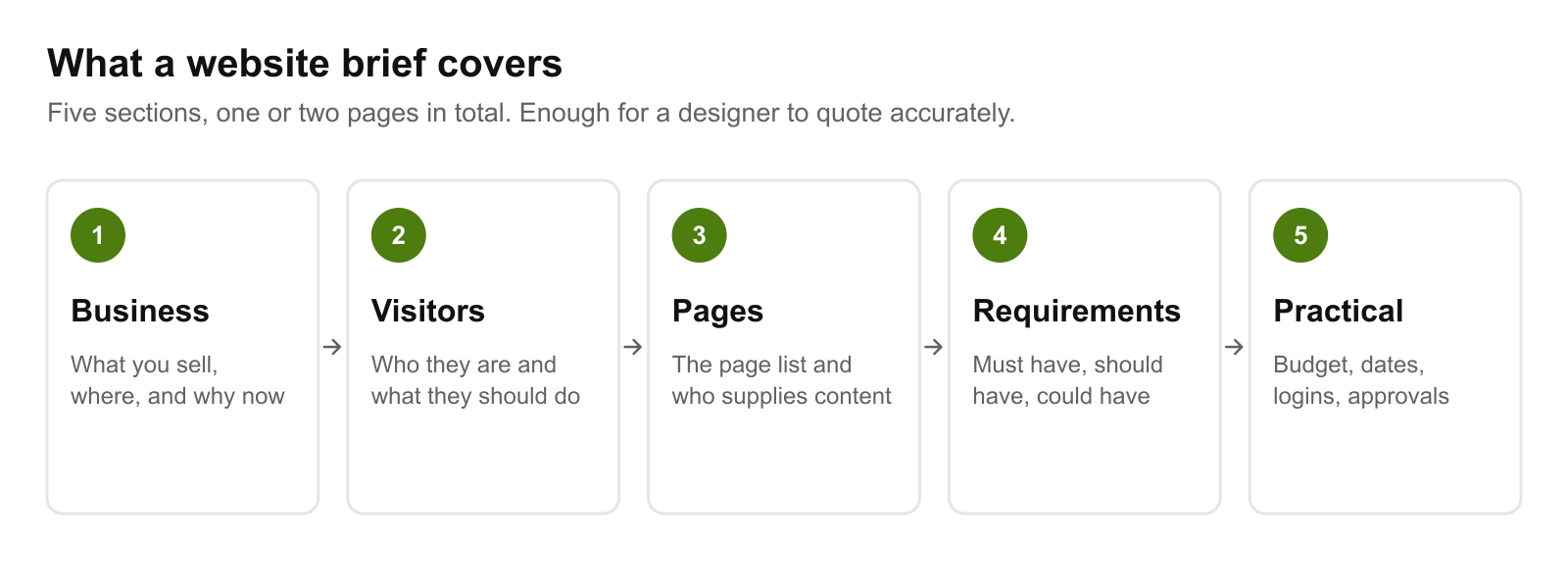
1. Your business and why now
Three or four sentences. What you sell, where you work, who your competitors are, and what has prompted the project. "Our current site does not work on phones and we get no enquiries from it" is more useful to a designer than a company history.
State the goal as something you can count: enquiries per month, online orders, bookings, phone calls.
2. Your visitors and what you want them to do
Describe the people who will use the site and what each needs from it. A simple format helps. The UK Government's service manual writes requirements as user stories in the form "As a... I need... So that..." (GOV.UK Service Manual). For a small business that might be:
- As a homeowner with a blocked drain, I need to see that you cover my suburb and call you in one tap, so that I can get it fixed today.
- As an office manager comparing cleaners, I need to see prices and reviews, so that I can shortlist you without phoning.
Two or three of these tell a designer more than a paragraph about "target demographics". They also help decide what goes at the top of each page. Our guide to lead generation websites explains how those actions turn into enquiries.
3. Pages and content
List every page you expect. For most service businesses that is a home page, one page per service, an about page, a contact page and any policy pages. Give each service its own page: a page about one service can appear in search for that service, which is harder for a single "Services" page that lists everything.
Then, for each page, say who supplies the words and images: you, the designer, or a copywriter and photographer. Content affects both the cost and the timeline, and it is easy to leave out of a brief. If you have an existing site, say which content is being kept. A content audit, which lists and reviews everything on the current site and who is responsible for it, is one way to decide (Digital.gov).
4. Requirements, in order of priority
List the features and sort them. The UK service manual uses four groups: must have, should have, could have and will not have, where must-haves are the things the product cannot function without (GOV.UK Service Manual).
| Priority | Meaning | Examples |
|---|---|---|
| Must have | The site fails without it | Contact form, click-to-call, works on phones |
| Should have | Important, but could follow launch | Blog, reviews feed, booking system |
| Could have | Nice if budget allows | Animation, live chat |
| Will not have | Out of scope for now | Online store, members' area |
The last row matters as much as the first. Writing down what is out of scope helps stop it creeping back in.
Three requirements are worth stating in measurable terms:
- Speed. Google's Core Web Vitals give targets you can quote: main content loading within 2.5 seconds, response to input within 200 milliseconds, and layout shift of 0.1 or less (web.dev).
- Accessibility. Name the standard and level. The W3C says an accessibility commitment should state the standard, the conformance level and the scope, with measurable milestones (W3C Web Accessibility Initiative). At the time of writing WCAG 2.2 is the current version, and the W3C encourages using the latest version (W3C).
- Search. If you are replacing a site, ask for a map of old addresses to new ones, redirects, and monitoring after launch. Google recommends keeping redirects for generally at least a year (Google Search Central).
5. Practical details
- Budget range. A range, not a single figure. Our Adelaide website pricing guide has indicative 2026 bands if you need a starting point.
- Dates. Your ideal launch date and whether it is fixed. Our guide to how long a website takes to build explains which parts of the timeline you control.
- Who approves. One named person for sign-off.
- What you already have. Domain name, hosting, logo files, brand colours, photos, existing accounts.
- After launch. Who updates the site, and whether you want the designer to maintain it or run SEO.
- How to respond. The deadline for quotes and what you want in them.
What Australian details should the brief mention?
These are the items an Australian business is likely to need a decision on. This is general information, not legal advice.
Domain name. A .com.au name is for businesses with a connection to Australia, usually shown by an active ABN or ACN (auDA). Say whether you own the domain already and who holds the login.
Privacy policy. At the time of writing, the Privacy Act generally covers organisations with an annual turnover of more than $3 million, and some small businesses whatever their turnover, including health service providers (OAIC). The Government recommends publishing a privacy policy on your website (business.gov.au). For businesses that are covered, the OAIC lists what the policy must contain, including the kinds of information collected, how and why, and how people can access it or complain (OAIC). In the brief, say whether you have a policy or need one.
Email sign-ups. If the site will collect email addresses for marketing, you need permission before sending commercial messages, and unsubscribe requests must be actioned within 5 working days (business.gov.au). Ask for a consent checkbox on forms and a record of who agreed and when.
Selling online. A displayed total price must include all charges, taxes and fees (business.gov.au), and store policies cannot override the consumer guarantees under Australian Consumer Law (business.gov.au). Note in the brief that prices will be shown inclusive and that returns wording needs to be reviewed.
Accessibility. The Disability Discrimination Act 1992 applies to the private sector as well as government (W3C Web Accessibility Initiative), and the Government's website guide says to design your site so people with disability can access it. State the standard you expect and ask how it will be tested.
Website brief template
Copy this, fill it in, and send the same version to each designer.
WEBSITE BRIEF

1. BUSINESS
Business name:
What we sell:
Where we work (suburbs, city, regions):
Main competitors:
Why we need this website now:
What success looks like (for example, enquiries per month):

2. VISITORS
Who visits, and what each needs:
- As a ____, I need ____, so that ____.
- As a ____, I need ____, so that ____.
The main action we want visitors to take:

3. PAGES AND CONTENT
Page list:
- Home
- [Service 1]
- [Service 2]
- About
- Contact
- Privacy policy
Who supplies the words:
Who supplies the photos:
Content we are keeping from the current site:
Current website address (if any):

4. REQUIREMENTS
Must have:
Should have:
Could have:
Will not have (out of scope):
Speed target: meets Core Web Vitals "good" thresholds on mobile
Accessibility target: WCAG 2.2 level ____ , tested by ____
Replacing an existing site? Redirect map and post-launch monitoring required: yes / no

5. PRACTICAL
Budget range:
Ideal launch date, and is it fixed:
Who approves each stage (one name):
We already have: domain / hosting / logo files / photos / Google Business Profile
Who holds the domain login:
Privacy policy: have one / need one
Email marketing sign-up needed: yes / no
Selling online: yes / no
After launch, who updates the site:
Ongoing maintenance or SEO wanted: yes / no

How to respond
Quote due by:
Please include: price by stage, timeline by stage, what you need from us and when,
what is not included, and two examples of similar work.
What are common mistakes in a website brief?
- No page list. "A professional website" can mean five pages or fifty.
- No budget. Designers have to guess, and the quotes become hard to compare.
- Features without priorities. Everything looks essential until the quote arrives.
- Describing the design instead of the outcome. "Modern and clean" tells a designer little. "Visitors should be able to call us in one tap from any page" tells them a lot.
- Leaving out content. If nobody is named as the writer, the site waits for words.
- A different brief for each designer. Then you are comparing briefs, not quotes.
- Too many approvers. Name one.
Our list of website design mistakes covers what goes wrong after the brief, during the build itself.
What should you ask for in return?
A quote that answers a good brief should include a price and a timeline broken down by stage, a list of what the designer needs from you and when, what is not included, and examples of similar work you can look at. For an example of how an agency sets out its stages, see the process section of our Web Design Adelaide page. If packages are offered, our guide to website design packages explains what is usually inside them. Our guide to choosing a web development agency covers how to assess the replies.
Ready to send your brief?
Our Web Design Adelaide service begins with discovery, which covers the same ground as this template, and for a first website our small business web design page explains what to have ready. Get in touch with your brief, or with the half-finished version, and we can tell you what looks missing.
Work With wow.digital
If you would rather have this handled for you, these pages explain what we do and where we work:
Keep Reading
Frequently asked questions
What is a website brief?
A website brief is a short document that tells a web designer what your business does, who the website is for, what pages and features it needs, and your budget and timing. It lets several designers quote on the same scope so the quotes can be compared.
What should a website brief include?
Five sections: your business and why you need the site now, who your visitors are and what you want them to do, the list of pages and who supplies the content, the features sorted into must have, should have and could have, and the practical details such as budget, dates, logins and who approves the work.
How long should a website brief be?
In our view, one or two pages is enough for most small-business websites. A brief is useful when it is specific, not when it is long. A page list and a clear list of must-have features do more than paragraphs of background.
Should I put my budget in a website brief?
Yes, as a range. Without one, designers have to guess the scale of the project, and the quotes are hard to compare because each may assume a different amount of work. A range lets a designer tell you what is achievable within it.
Do I need a privacy policy on my website?
The Privacy Act generally covers organisations with an annual turnover of more than $3 million, and some smaller businesses regardless of turnover, such as health service providers. The Australian Government recommends publishing a privacy policy on your website. Mention in the brief whether you have one or need one written.
Does my website have to be accessible?
The Disability Discrimination Act 1992 applies to the private sector as well as government, and the Australian Government's guide to setting up a business website says to design your site so people with disability can access it. In a brief, name the standard you want, for example WCAG 2.2 level AA, and ask how it will be tested.
Can I use the same brief to get several quotes?
Yes, and that is the main reason to write one. Send the same document to each designer, give them the same deadline, and ask for the quote to be broken down by stage so you can see where the differences are.