What Is Google AI Mode? A Plain Guide for Australian Businesses
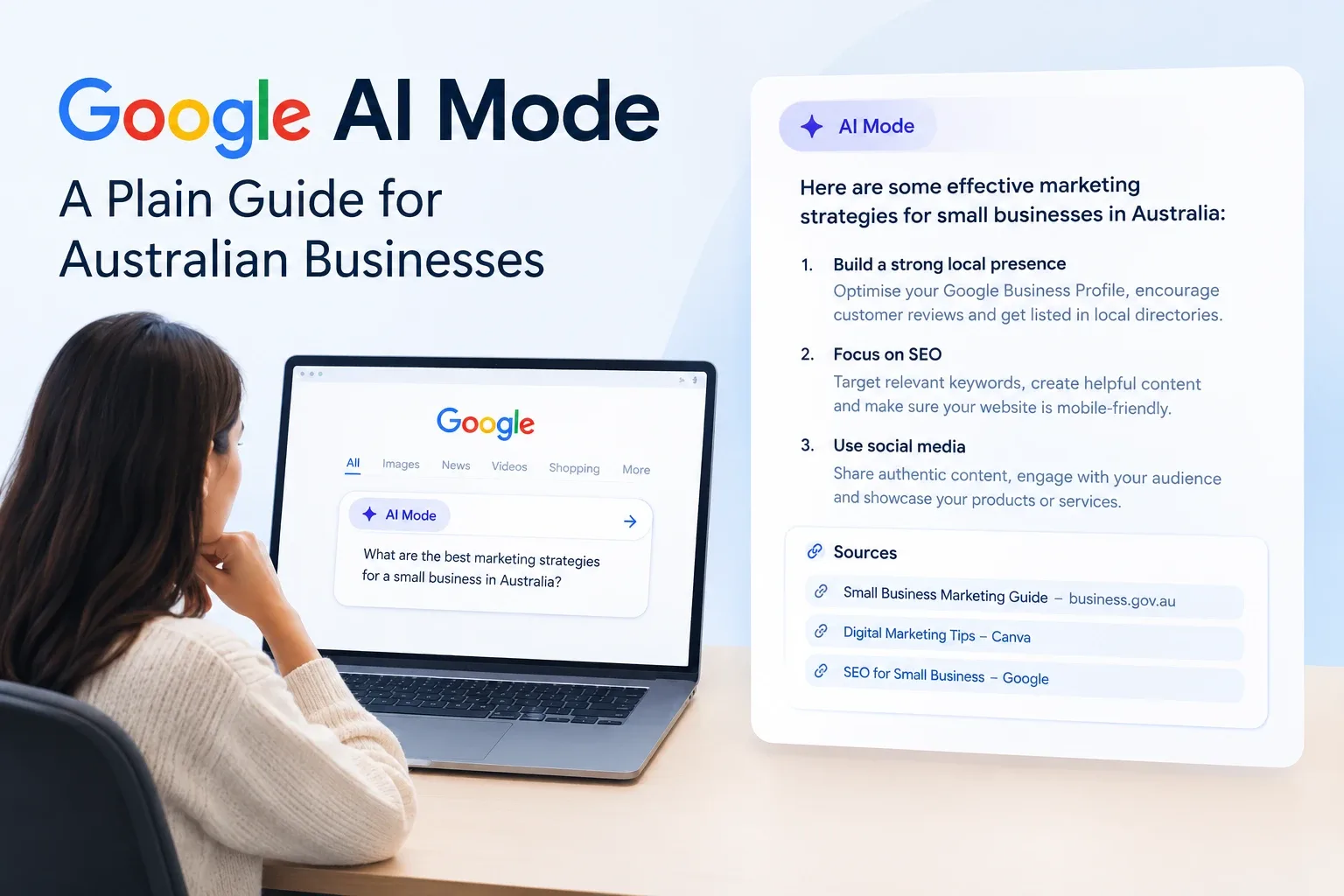
Quick answer: Google AI Mode is a chat-style way to search inside Google. Instead of a list of links, it gives one written answer to a long or complicated question, with links to the pages it drew on, and lets you ask follow-ups. Google launched it in Australia on 8 October 2025. There is nothing special to install or add to your website to appear in it: the same things that make a page rank make it eligible.
This guide covers what AI Mode is, how it differs from AI Overviews and ChatGPT, what the research says about people clicking less, and what a business should do. Where the evidence is thin or comes from the United States only, we say so.
What is Google AI Mode?
AI Mode is a separate view in Google Search, built on a custom version of Google's Gemini models. Google describes it as its "most powerful AI search experience" and says it is for longer, more complex questions that would otherwise take several searches (Google Australia blog, 8 October 2025).
In practice it differs from normal search in three ways:
- You ask in full sentences. Google says early testers asked questions nearly three times the length of a traditional search.
- You get one answer. The reply is written text with links to web pages, not ten blue links.
- You can keep going. Follow-up questions carry on from the previous answer.
You can type, speak, or take or upload a photo and ask about it.
When did AI Mode launch?
| Date | What happened |
|---|---|
| March 2025 | Google introduced AI Mode as an experiment in the United States (Google) |
| May 2025 | Rolled out more widely in the United States |
| 7 October 2025 | Expanded to more than 200 countries and territories and over 35 new languages (Google) |
| 8 October 2025 | Launched in Australia, in English |
How does Google AI Mode work?
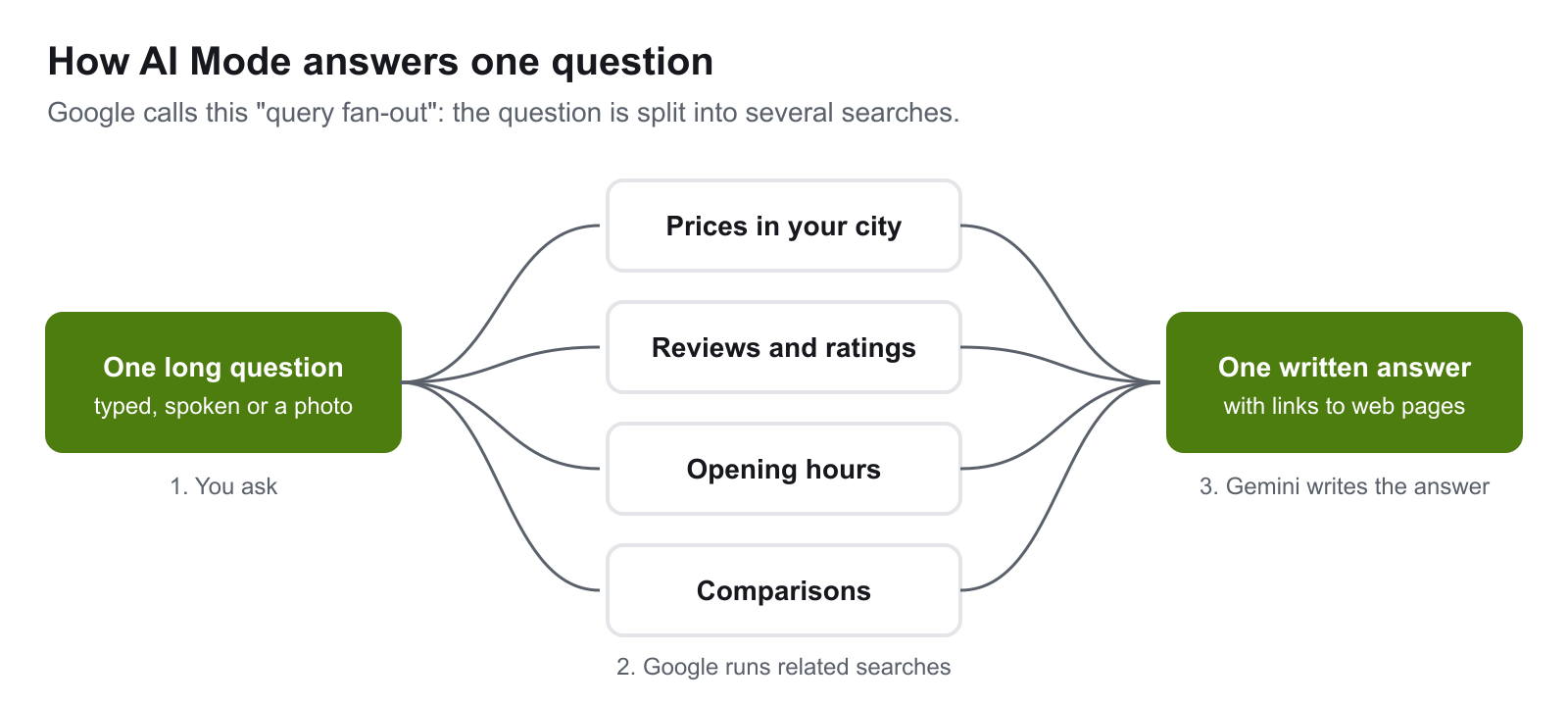
AI Mode uses a technique Google calls query fan-out. Google's documentation describes it as "issuing multiple related searches across subtopics and data sources" to build the response and find supporting pages (Google Search Central). The sub-searches in the diagram above are an illustration of the idea, not a list Google publishes.
This matters for a website in one specific way. Your page does not need to match the long question the person typed. It needs to be a good result for one of the smaller searches Google runs on their behalf. A page that answers one narrow question clearly can be picked up as a source for a much broader one.
AI Mode vs AI Overviews vs ChatGPT
These three are often mixed up.
| Google AI Mode | Google AI Overviews | ChatGPT | |
|---|---|---|---|
| What it is | A conversational view inside Google Search | A short AI summary above normal results | A separate AI assistant from OpenAI |
| How you get it | You choose to open it | Google shows it on some searches | You open the app or site |
| Best suited to | Long, multi-part questions and follow-ups | Quick factual questions | Open-ended tasks and conversation |
| Where answers come from | Google's index, via query fan-out | Google's index | Its training data, plus web search when used |
| Links to websites | Yes | Yes | When it searches the web |
| Can it be turned off | You simply do not open it | No, per Google | Not applicable |
AI Overviews are the more common of the two Google features. Google reported more than 2 billion monthly users of AI Overviews across over 200 countries, and said AI Mode had passed 100 million active users in the United States and India (Think with Google Australia, October 2025).
What is zero-click search?
A zero-click search is one where the person gets what they need on the results page and never visits a website. It is older than AI. Weather boxes, maps, calculators and featured snippets have ended searches on Google's own page for years.
Two studies are quoted most often, and it helps to know exactly what each one measured.
SparkToro and Datos, July 2024. Using a panel of browsing data from September 2022 to May 2024, the study found that 58.5% of Google searches in the United States, and 59.7% in the European Union, ended without a click (SparkToro). Most of that period was before AI Overviews existed, so this is a baseline for search in general.
Pew Research Center, July 2025. Pew tracked the browsing of 900 US adults during March 2025, covering 68,879 Google searches, of which 18% produced an AI summary (Pew Research Center).
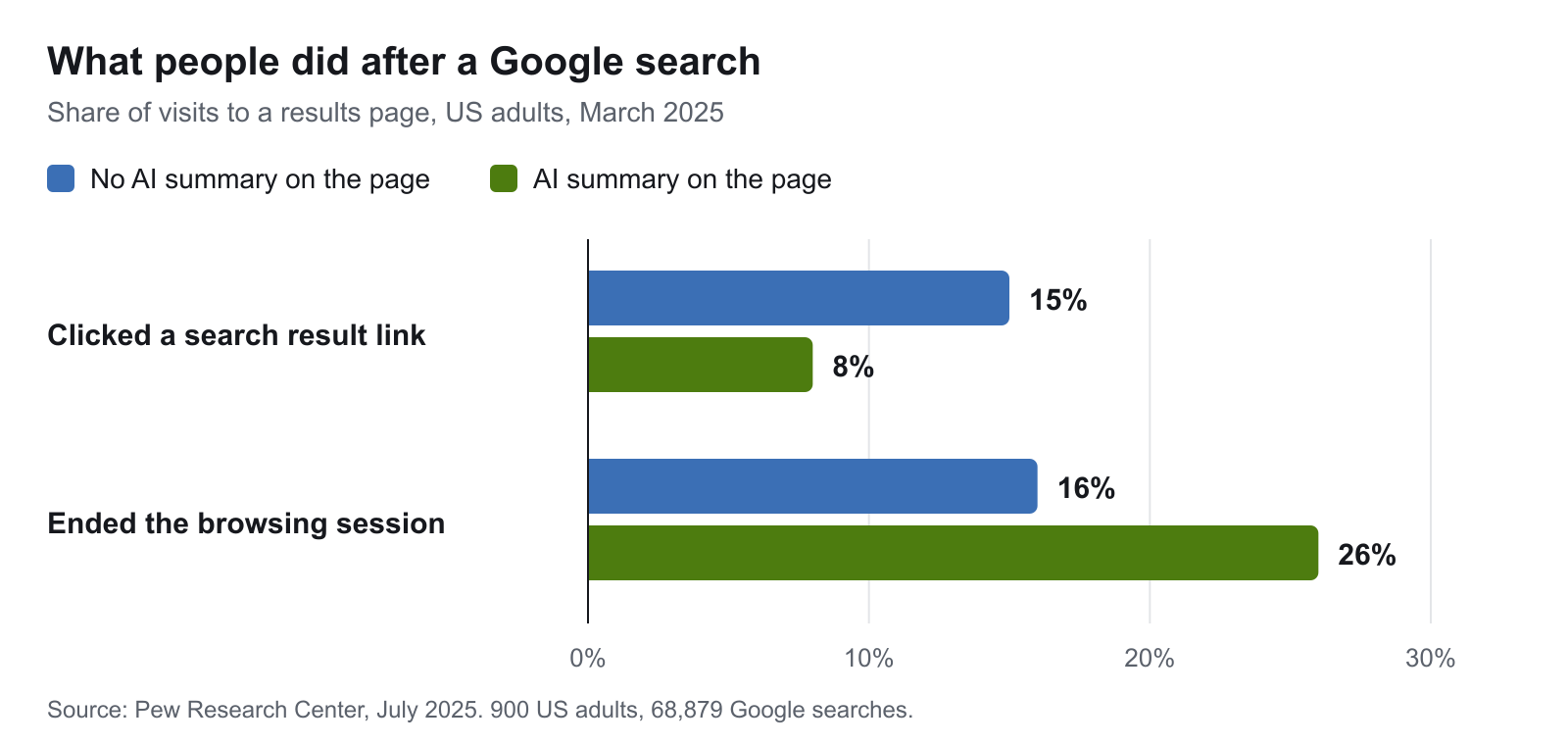
When an AI summary was on the page, people clicked a normal result on 8% of visits, against 15% when there was none. They clicked a link inside the summary on 1% of visits. They were also more likely to stop browsing altogether: 26% against 16%.
What these studies do not tell you
- Both are American. Neither includes Australian users. Australians use the same Google, so similar behaviour is likely, but it has not been measured in the same way here.
- Pew measured AI summaries on the results page, which are AI Overviews. It did not measure AI Mode, which people open on purpose.
- Pew's data is from March 2025, before AI Mode was widely available anywhere.
So the honest summary is: AI summaries roughly halve clicks on the searches where they appear, in the one careful study we have, and nobody has published the same for AI Mode in Australia.
Google's own position is that clicks from results pages with AI Overviews are "higher quality", meaning visitors spend more time on the site. That is Google describing its own product, without published figures, so weigh it accordingly.
Is zero-click search bad for your business?
Not uniformly. It depends on what the searcher wanted.
Searches you lose. Simple factual questions: what something means, how long something takes, what a term stands for. The answer is given on the page. These visitors rarely became customers, so the lost visit costs less than the traffic graph suggests.
Searches you keep. Anything where someone has to choose, compare, book or buy. A written answer can list three web designers; it cannot show a portfolio, take a booking or give a quote. People still click through for those.
Searches where being named is the win. If an AI answer mentions your business as an option, some people will search for you by name later or come straight to your site. That shows up as branded search and direct traffic, not as a click from the original query.
The practical risk is a business whose traffic was mostly informational articles. Its visit numbers can fall while enquiries hold steady, and the two need to be read separately.
What does AI Mode do to your analytics?
Three things to expect in your reports.
- Impressions can rise while clicks stay flat. Your page can be shown as a source in an AI answer, which counts as an impression, without being clicked.
- You cannot separate AI Mode traffic. Google says AI Mode and AI Overview traffic is "included in the overall search traffic in Search Console", in the Performance report under the Web search type. There is no AI Mode filter.
- Click-through rate becomes harder to read. A falling rate may mean your listing got worse, or that an AI summary now sits above it.
Because of this, track outcomes alongside traffic: enquiries, calls, bookings and sales, and how many people search for your business by name.
A note from our own Search Console. In its first weeks of being indexed, our site appeared at position 7 for searches such as "optimize for ai search". That was a handful of impressions and no clicks, far too few to draw a conclusion from, and we mention it only to show how small early numbers are. Judge this kind of work over months.
What should Australian businesses do about AI Mode?
Google's guidance is short. To appear as a supporting link in AI Mode or AI Overviews, a page must be indexed and eligible to show in Search with a snippet. In Google's words, "there are no additional technical requirements". It also says you do not need new machine-readable files, AI text files or special schema.
That rules out a lot of what is sold as "AI optimisation". What is left is ordinary good practice, with a few points that matter more than before.
- Make sure your pages can be crawled and indexed. A page Google cannot reach cannot be a source. Our technical SEO checklist covers the checks.
- Put the answer in the HTML. Content that only appears after JavaScript runs is harder for Google and invisible to most other AI crawlers.
- Answer one question clearly per page or section. Query fan-out rewards pages that are a good result for a narrow search. State the answer first, then explain. Our guide to writing blog content that ranks covers the structure.
- Cover the topic, not one keyword. If Google splits a question into several searches, a site that answers the related questions has more chances to be picked. See content strategy for SEO.
- Say things only you can say. Your own prices, process, results and local knowledge. An AI answer can summarise general advice from anywhere, so general advice is the easiest content to replace.
- Keep your business details consistent. Name, services, location and contact details should match on your site, your Google Business Profile and directories.
- Do not block Google's snippet. Controls such as
nosnippetandmax-snippetlimit how your content appears in AI features too. Use them only if you mean to. - Measure enquiries, not only clicks.
Our guide to AI search optimisation goes further into being cited by ChatGPT, Perplexity and Google's AI features.
What about ads in AI Mode?
In October 2025, Google said ads were being tested in AI Mode in the United States and that it had no firm launch date for ads in AI Mode or AI Overviews in Australia. That statement is now a year old, so check Google's current announcements before planning a budget around it.
How do you turn off AI Mode on Google?
Many people search for this, so here is the direct answer.
- AI Mode only runs when you open it. If you stay on the normal results, you are not using it.
- AI Overviews cannot be switched off. Google's help page says they are "a core Google Search feature" like knowledge panels (Google Search Help).
- To see links only, choose the Web filter after you search. It shows text links without AI Overviews.
Website owners have a separate set of controls. noindex removes a page from Search altogether. nosnippet and max-snippet limit what Google may quote. The Google-Extended setting in robots.txt limits use of your content for training and grounding in some of Google's other AI systems, and Google states it does not affect Search. Most businesses that want to be found should leave all of these alone.
The short version
- Google AI Mode is a conversational view in Google Search that answers long questions in one reply, with links. It reached Australia on 8 October 2025.
- It works by splitting a question into several searches, so clear pages on narrow questions can be used as sources for broad ones.
- The best study so far, from the United States, found people click about half as often when an AI summary is on the page. Nothing equivalent exists yet for AI Mode in Australia.
- Google says no special markup or files are needed. Indexable, clear, specific pages are the requirement.
- Watch enquiries and branded searches as well as clicks.
If you would like to know how your site stands, get in touch. We start with whether your pages can be crawled, indexed and quoted, then look at what they say. Our guide to choosing a local SEO agency covers what to ask anyone you hire for this work, us included.
Work With wow.digital
If you would rather have this handled for you, these pages explain what we do and where we work:
Keep Reading
Frequently asked questions
What is Google AI Mode?
Google AI Mode is a chat-style search experience inside Google Search. You ask a long or multi-part question, Google runs several related searches behind the scenes, and its Gemini model writes one answer with links to web pages. You can then ask follow-up questions in the same conversation.
Is Google AI Mode available in Australia?
Yes. Google announced AI Mode for Australia, in English, on 8 October 2025. It is built into Google Search.
What is the difference between AI Mode and AI Overviews?
An AI Overview is a short AI-written summary that Google places above the normal results for some searches. AI Mode is a separate conversational view that you choose to open, built for longer questions and follow-ups. Both can use query fan-out and both link to web pages.
How do I turn off AI Mode on Google?
AI Mode only runs when you open it, so the simplest answer is to stay on the normal results. AI Overviews are different: Google's help page says they are a core Search feature and cannot be turned off, but choosing the Web filter after a search shows text links only.
Do I need special markup or files to appear in AI Mode?
No. Google's documentation says there are no additional technical requirements, no special schema and no AI text files needed. A page has to be indexed and eligible to appear in Google Search with a snippet.
Can I see AI Mode traffic in Search Console?
Not separately. Google says traffic from AI Mode and AI Overviews is included in the overall totals in the Search Console Performance report, under the Web search type.
Is zero-click search bad for my business?
It depends on what the search was for. A search that only needed a fact was unlikely to become a customer. Searches where someone is choosing a provider still lead to visits, calls and enquiries, and being named in the answer has value even when nobody clicks.