Technical SEO Checklist: 15 Checks for a Technical SEO Audit

Quick answer: A technical SEO checklist confirms five things, in this order: search engines can crawl your pages, the right pages are indexed, each page is fast and usable on a phone, each page is clearly described, and you will find out when something breaks. This checklist has 15 checks across those five stages, each with a free way to test it.
Good content cannot rank if search engines cannot reach it. Most technical problems are also invisible from the outside: the site looks fine in a browser while a rule in one file hides half of it from Google. That is why the checks below are worth running in order.
How to use this technical SEO checklist
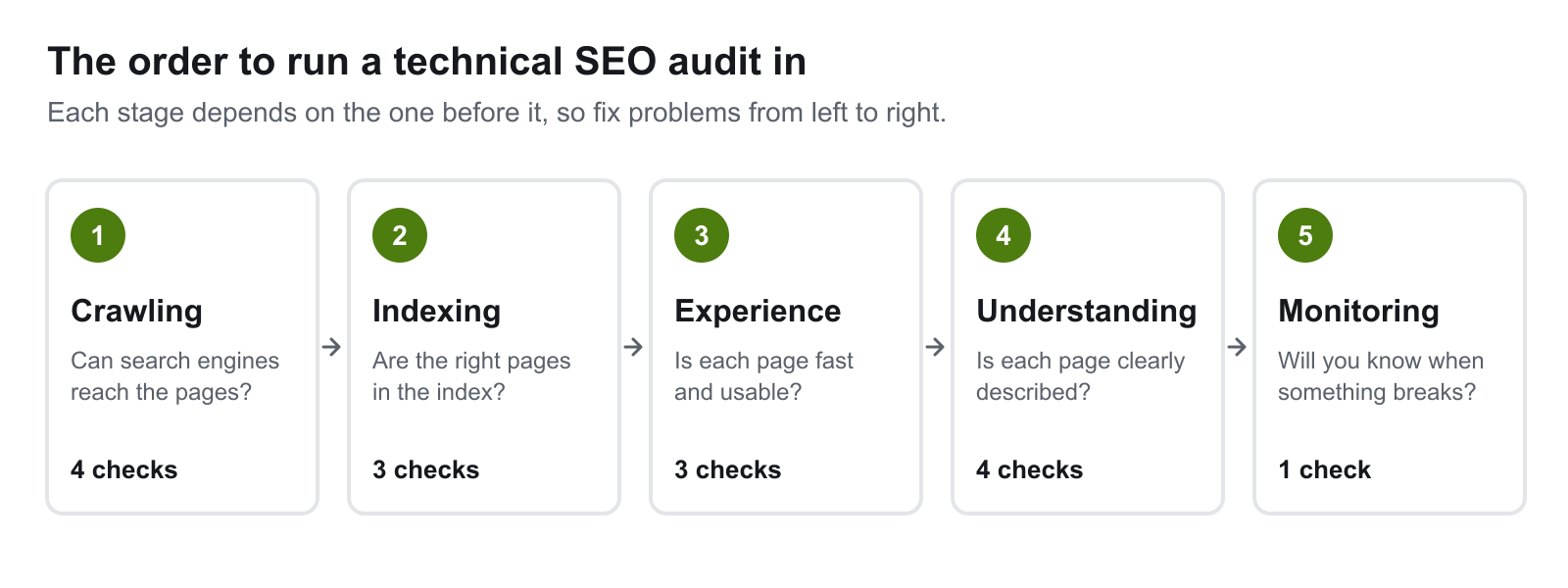
Work from left to right. A page that cannot be crawled will not be indexed, and a page that is not indexed gains nothing from faster loading or structured data. Fix the earliest failing stage first.
| # | Check | Free tool | Fix first? |
|---|---|---|---|
| 1 | robots.txt is not blocking pages you want found | Search Console, your /robots.txt |
Yes |
| 2 | XML sitemap exists and is current | Search Console > Sitemaps | Yes |
| 3 | No broken internal links or 404s | Screaming Frog (free to 500 URLs) | |
| 4 | No redirect chains | Screaming Frog | |
| 5 | Important pages are indexed | Search Console > Pages | Yes |
| 6 | Canonical tags are correct | URL Inspection | |
| 7 | No duplicate or thin pages competing | Search Console, a crawl | |
| 8 | Core Web Vitals pass | PageSpeed Insights | Yes |
| 9 | Pages work on a phone | PageSpeed Insights, a real phone | Yes |
| 10 | The whole site is on HTTPS | A browser, a crawl | |
| 11 | Unique titles and meta descriptions | A crawl | |
| 12 | Structured data is valid | Rich Results Test | |
| 13 | Page addresses are descriptive | A crawl | |
| 14 | Images have alt text | A crawl | |
| 15 | Monitoring is in place | Search Console email alerts |
Stage 1: Can search engines crawl the site?
1. robots.txt is not blocking pages you want found
One Disallow line in robots.txt can hide a whole section of a site from search engines. Open yoursite.com.au/robots.txt and read every rule. Check it again after any platform change, because staging sites are often launched with a rule that blocks everything.
Two details matter. First, robots.txt controls crawling, not indexing: Google's documentation says a blocked page can still appear in results if other pages link to it. Second, the same file controls AI crawlers such as GPTBot, ClaudeBot and PerplexityBot. Blocking them keeps your pages out of those assistants' answers, so decide that on purpose.
2. The XML sitemap exists and is current
A sitemap lists the pages you want crawled. Google says small, well-linked sites may not need one, but it costs little and helps new pages get found. Check that it exists, that it is submitted in Search Console, that it lists only pages that return a normal response, and that it was regenerated after your last restructure.
3. No broken internal links or 404s
A broken link is a dead end for visitors and for crawlers. Crawl the site with a tool such as Screaming Frog's SEO Spider, which is free for up to 500 addresses, and fix every internal link that returns a 404. Either correct the link or redirect the old address.
4. No redirect chains
A chain is when address A redirects to B, which redirects to C. Each hop slows the visitor down. Google's crawler follows up to 10 hops before giving up, but there is no reason to make it. Point every redirect, and every internal link, straight at the final address.
A note on crawl budget, which older checklists make much of: Google's own guide says it is a concern for very large or fast-changing sites. On a site with a few hundred pages, fix broken links and chains because they hurt visitors, not because of crawl budget.
Stage 2: Are the right pages indexed?
5. Important pages are indexed
In Search Console, open the Pages report. It lists which addresses are indexed and why the rest are not. Look for pages you care about under reasons such as "Excluded by noindex tag", "Blocked by robots.txt" or "Crawled, currently not indexed". Then test individual addresses with URL Inspection.
Two common causes: a noindex tag left over from development, and content that only appears after JavaScript runs. Google does render JavaScript, but as a later, separate step, and most AI crawlers do not render it at all. The safest position is for the main content to be in the HTML the server sends.
Do not combine a robots.txt block with a noindex tag on the same page. If Google cannot crawl the page, it never sees the tag.
6. Canonical tags are correct
The same page is often reachable at several addresses: with and without a trailing slash, with tracking parameters, on www and without. A canonical tag tells search engines which address is the main one. Each indexable page should have a canonical pointing to itself, using the full address. A canonical that points at the homepage from every page, a common template fault, tells Google the other pages are copies.
7. No duplicate or thin pages competing with each other
Several pages aimed at the same search compete with each other. Search Console shows this when two of your addresses swap places for one query. Merge them into one stronger page and redirect the weaker address. The same applies to near-empty pages: improve them, merge them or remove them from the index.
Stage 3: Is each page fast and usable?
8. Core Web Vitals pass
Core Web Vitals are Google's three measurements of real-world page experience: Largest Contentful Paint (loading), Interaction to Next Paint (responsiveness, which replaced First Input Delay in March 2024) and Cumulative Layout Shift (visual stability). Google's guidance is to keep them within 2.5 seconds, 200 milliseconds and 0.1.
Google states that Core Web Vitals are used by its ranking systems, and also that good scores do not guarantee rankings. Treat them as a floor to clear, not a lever.
Test with PageSpeed Insights and read the mobile result. When we ran this check on our own homepage it failed badly: a layout shift of 1.106 against a limit of 0.1, and a largest paint of 12.3 seconds. The cause and the fix are written up in our page speed case study, and the usual causes are in our guide to why websites are slow.
9. Pages work on a phone
Google indexes and ranks from the mobile version of a site. If content, links or structured data are missing on mobile, they are missing as far as Google is concerned. Check that the mobile page has the same content as desktop, that text is readable without zooming, that buttons are large enough to tap, and that nothing scrolls sideways. Test on a real phone as well as in a tool.
10. The whole site is on HTTPS
Every address should load over HTTPS, and every http:// address should redirect to its https:// version in one hop. Google has used HTTPS as a ranking signal since 2014, a light one, and browsers warn visitors away from pages without it. Also check for mixed content: an HTTPS page that loads an image or script over HTTP.
Search Console is a quick way to confirm the redirect is being picked up. Ours still listed the http:// address of the homepage with a few impressions in its first weeks, which is normal while Google consolidates the two.
Stage 4: Is each page clearly described?
11. Every page has a unique title and meta description
The title is the main input to the headline Google shows for a page, and the meta description is often used for the text under it. Each page needs its own. Duplicates are common on template-built sites where every page inherits the same default. A crawl lists them in one pass.
12. Structured data is valid
Structured data is code that labels what a page is: an article, a product, an organisation, a set of questions and answers. It helps search engines understand the page and makes it eligible for rich results. Test each page type with the Rich Results Test, and make sure the markup matches what is visible on the page.
It is not a requirement for AI answers. Google says no special markup is needed to appear in its AI features. Our guide to AI search optimisation covers what does help, and what Google AI Mode is explains how Google's AI search chooses its sources.
13. Page addresses are descriptive
/page?id=4829 says nothing. /blog/technical-seo-checklist says what the page is before anyone opens it. Google recommends simple, readable addresses with words separated by hyphens. Do not rename established addresses only to tidy them: a changed address needs a redirect and takes time to settle.
14. Images have alt text
Alt text describes an image to people using screen readers, and Google uses it, with the surrounding text, to understand what the image shows. Write a short, accurate description. Leave it empty for purely decorative images. Do not fill it with keywords.
Stage 5: Will you know when something breaks?
15. Monitoring is in place
Technical problems rarely announce themselves. Traffic falls and someone notices weeks later. At a minimum:
- Verify the site in Search Console and keep its email alerts switched on.
- Check the Pages and Core Web Vitals reports monthly.
- Re-run a crawl after every release that changes templates, navigation or addresses.
What to fix first
Do not try to fix all 15 at once.
- Crawling and indexing (checks 1, 2, 5). If pages are blocked or missing from the index, nothing else on the list can help them.
- Speed and mobile (checks 8, 9). These affect every visitor as well as search.
- Links, redirects, canonicals and HTTPS (checks 3, 4, 6, 10). Usually quick to fix once a crawl has listed them.
- Titles, addresses and alt text (checks 11, 13, 14). Steady, page-by-page work.
- Structured data and duplicate content (checks 7, 12). The most effort, so plan them as their own piece of work.
Run the whole checklist again after any redesign or rebuild. That is when a clean site most often picks up a blocked robots.txt, lost redirects or a stray noindex. Website redesign vs rebuild covers how to protect rankings through either.
Want this run on your site?
A technical audit is the first thing we do before starting any SEO campaign or web design project. Get in touch and we will tell you which of the 15 your site passes and which it fails.
Related Web Design Services
If this topic is part of a website project, these service pages explain how wow.digital approaches the build itself:
Keep Reading
Frequently asked questions
What is technical SEO?
Technical SEO is the work of making sure search engines can reach, read and index a website's pages. It covers crawling, indexing, page speed, mobile usability, security, page addresses and structured data. It is separate from the content on the page and from links from other sites.
What does a technical SEO audit include?
A technical SEO audit checks whether pages can be crawled, whether the right pages are indexed, how fast and usable they are on a phone, whether each page is clearly described with titles, structured data and clean addresses, and whether monitoring is in place. The 15 checks in this checklist cover those five areas.
How often should I run a technical SEO audit?
Run the full checklist after any redesign, rebuild, platform change or large content restructure, because that is when most technical problems are introduced. Between those, check Search Console monthly and run the full list a few times a year.
Can I do a technical SEO audit for free?
Yes, for a small site. Google Search Console, PageSpeed Insights and the Rich Results Test are free, and Screaming Frog's SEO Spider crawls up to 500 addresses on its free version. Larger sites need paid crawling tools.
Can technical SEO problems stop good content from ranking?
Yes. A page that is blocked from crawling, missing from the index or returning an error cannot rank, however good its content is. Technical SEO does not make weak content rank, but it removes the barriers that stop good content from being seen.
Is structured data needed to appear in AI answers?
Google says no special markup is required for its AI features. Structured data still helps search engines understand a page and makes it eligible for rich results, so it is worth adding where it accurately describes the content.