How to Rank in Google AI Overviews: What Google Says and What to Do (2026)
Quick answer: Google says "there are no additional requirements to appear in AI Overviews or AI Mode, nor other special optimizations necessary". To be eligible, a page must be indexed and able to show in Google Search with a snippet. AI Overviews then use a "query fan-out" technique, running several related searches to find supporting pages. So the pages that get linked are the ones that already rank well for the question and its follow-ups, state their answer clearly in text, and come from sites Google trusts. There is no shortcut file, schema or tool that guarantees a place.
Unless another source is linked, Google quotes below come from its guide to AI features and your website, checked in October 2026. AI Overviews are the AI-written summaries at the top of many Google results pages; our guide to Google AI Mode explains how they differ from AI Mode.
Why AI Overviews matter
Google reported more than 2 billion monthly users of AI Overviews in October 2025 (Think with Google Australia). In a Pew Research Center study of US browsing in March 2025, 18% of Google searches produced an AI summary. When one appeared, people clicked a result on 8% of visits, against 15% when there was no summary (Pew Research Center). Our roundup of AI search statistics for Australia has the sources and more figures.
The practical point: when an AI Overview appears, fewer people click anything, and Pew found a link inside the summary was clicked on only 1% of those visits. Being one of the named sources keeps your business in front of the searcher even without a click, so judge results by enquiries as well as visits.
What Google says it takes
Google's requirements are short:
- Indexed and snippet-eligible. "To be eligible to be shown as a supporting link in AI Overviews or AI Mode, a page must be indexed and eligible to be shown in Google Search with a snippet."
- No extra technical requirements. "There are no additional technical requirements."
- No special files or markup. "You don't need to create new machine readable files, AI text files, or markup to appear in these features. There's also no special schema.org structured data that you need to add."
- No guarantee. Google adds that meeting every requirement "doesn't mean that Google will crawl, index, or serve its content".
Google also notes that AI Overviews "are only shown when our systems determine that it is additive to classic Search, and as such, often don't trigger". Many searches show none at all, so check which of your own key searches do.
How AI Overviews choose their sources
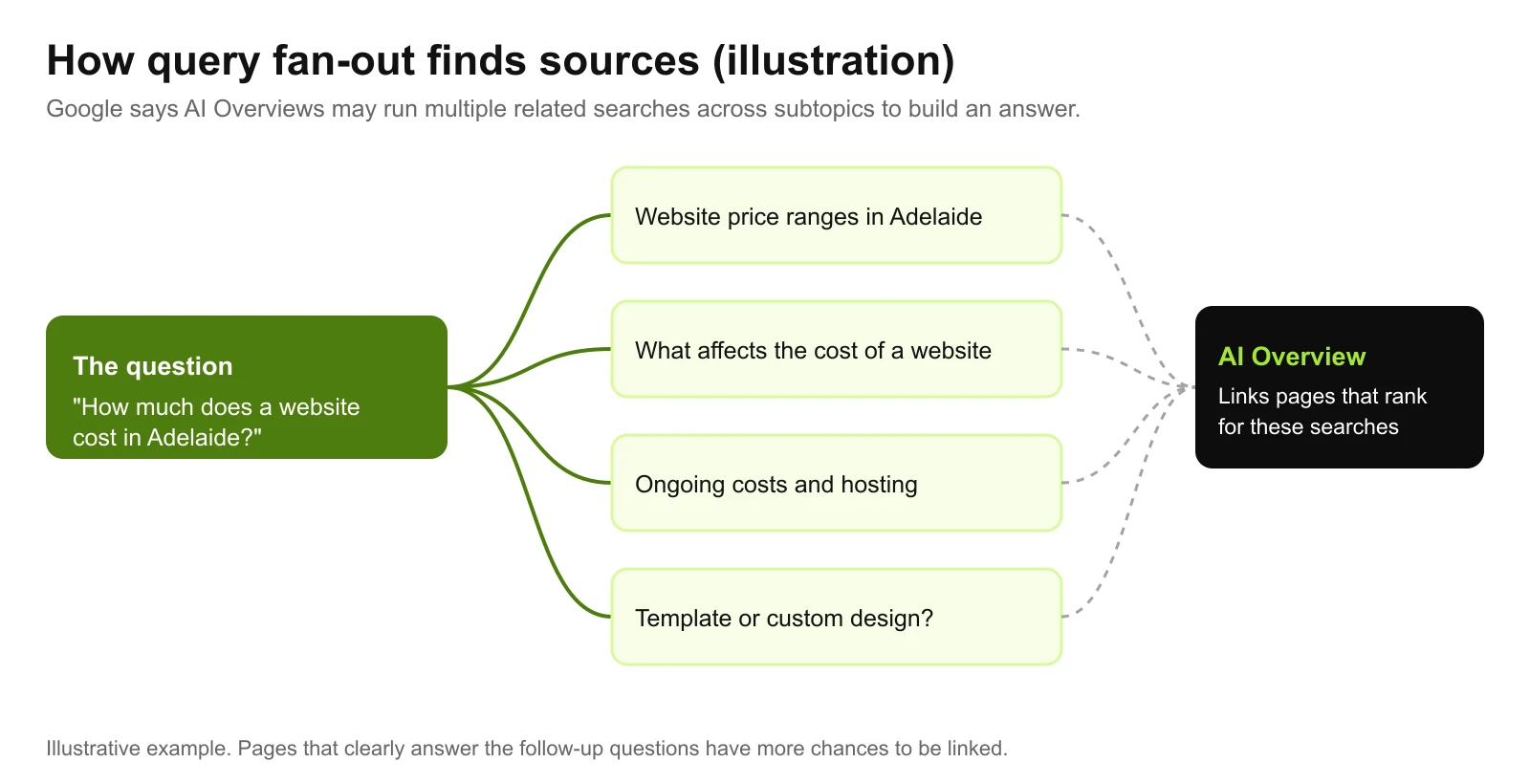
The related searches in the diagram are an illustration, not a list Google publishes.
Google says AI Overviews and AI Mode "may use a 'query fan-out' technique", issuing "multiple related searches across subtopics and data sources" to build a response. While the answer is generated, its models "identify more supporting web pages", so the links shown can be wider and more varied than a normal results page.
That has two consequences for your content:
- Ranking for the follow-up questions counts. A page that answers the main question and the obvious next ones has more chances to be picked than a page that answers one narrowly.
- Clear, quotable answers help. A model assembling a summary needs passages that state a fact plainly, such as a price range, a step or a definition, rather than marketing copy around it.
Nine steps to make your pages AI Overview candidates
1. Check the page is indexed and snippet-eligible
Use Search Console's URL Inspection tool. A nosnippet or very small max-snippet setting can keep a page out of AI Overviews.
2. Let Google crawl it
Google lists "ensuring that crawling is allowed in robots.txt, and by any CDN or hosting infrastructure". Firewall and bot-protection settings sometimes block Googlebot by accident.
3. Put important content in text
Google lists "making sure that important content is available in textual form". Prices inside images, answers hidden behind tabs that only load on click, or text that appears only after scripts run are harder to use.
4. Answer the question early
State the answer in the first sentences of the page or section, then explain. This also helps readers who only skim.
5. Cover the follow-up questions
List the questions a customer asks next, such as cost, timing, alternatives and risks, and answer each on the page or a linked page. That is how you meet the fan-out searches.
6. Keep structured data honest
Google lists "making sure your structured data matches the visible text on the page". Use the schema that fits your content, but there is no AI-specific type.
7. Keep Merchant Center and Business Profile current
Google lists "checking that your Merchant Center and Business Profile information is up-to-date". Google can use those details in answers for local and product searches. Our Google Business Profile checklist covers the profile.
8. Build authority
Google says its generative AI features are "rooted in our core Search ranking and quality systems" (Google Search Central). Reviews, mentions and links from trusted sites help pages rank, and ranking pages are the candidates.
9. Measure in Search Console
The generative AI performance report, rolled out to all websites by 31 August 2026, shows your impressions in AI Overviews and AI Mode by page, device and country, though not clicks (Search Console Help). Google also says sites appearing in AI features are counted in the main Performance report "within the 'Web' search type". Google's AI features guide also says clicks from results pages with AI Overviews "are higher quality (meaning, users are more likely to spend more time on the site)". Google hasn't published figures for that, so track enquiries and time on site, not just clicks.
Myths to ignore
| Myth | What Google says |
|---|---|
| You need an AI file, such as llms.txt, to appear | You don't need to create new machine readable files or AI text files |
| There's a special AI schema | There's no special schema.org structured data to add |
| You should chop content into small chunks for AI | Google says you can ignore tactics like "chunking" content |
| A tool can guarantee AI Overview placement | Indexing and serving aren't guaranteed, even when every requirement is met |
| AI Overviews replace SEO | "The best practices for SEO remain relevant for AI features" |
The chunking point comes from Google's guide to optimising for generative AI. Our guide to llms.txt explains what that file is actually for.
Limiting what AI Overviews show
If you would rather limit how your content appears, Google says to use the nosnippet, data-nosnippet, max-snippet or noindex controls, and points to Google-Extended for limiting AI training and grounding in some of Google's other systems. These controls also affect normal search snippets, so test them on a single page first.
Where to start
Pick the five questions your customers most often ask before buying. Search each one and note whether an AI Overview appears and who it links. Then check your own page for each question against the nine steps above. Our technical SEO checklist covers the crawling and indexing side, and our guide to answer engine optimisation covers writing answers AI tools can use.
If you want help, our AI SEO service covers AI Overviews, AI Mode and ChatGPT together, and we'll check what Google's AI features say about your business as part of a free website and SEO audit.
Work With wow.digital
If you would rather have this handled for you, these pages explain what we do and where we work:
Keep Reading
Frequently asked questions
How do I get my website into Google AI Overviews?
Google says there are no additional requirements. A page must be indexed and eligible to be shown in Google Search with a snippet. Beyond that, the usual SEO fundamentals apply: let Google crawl the page, put important content in text, answer the question clearly, cover related follow-up questions and build authority.
Do I need special schema or an llms.txt file for AI Overviews?
No. Google says you don't need to create new machine readable files, AI text files or markup to appear in its AI features, and there is no special schema.org structured data to add. Structured data should still match the visible text on the page.
How can I see if my site appears in AI Overviews?
Search Console has a generative AI performance report, rolled out to all websites by 31 August 2026, that shows impressions in AI Overviews and AI Mode by page, device and country, though not clicks. AI feature traffic is also counted in the main Performance report under the Web search type. You can also search your key questions yourself, though results vary by user and over time.
Can I stop my content appearing in AI Overviews?
Google says to use the nosnippet, data-nosnippet, max-snippet or noindex controls to limit what is shown from your pages in Search. These also affect your normal search snippets, so use them with care.
Why don't AI Overviews show for my searches?
Google says AI Overviews are only shown when its systems determine they add something beyond classic search results, and as such they often don't trigger. Many searches show none at all, so check which of your own key searches do.