Website Redesign vs Rebuild: How to Know Which One You Need
Quick answer: A website redesign changes how your site looks and reads, and keeps the platform it runs on. A website rebuild replaces that platform. If the site looks dated but works well, you need a redesign. If it is slow, hard to update, or built on something nobody can maintain, you need a rebuild, and new design will not fix that.
There is a third, smaller option that often gets overlooked: a refresh. This guide covers all three, how to tell which one your site needs, what each puts at risk, and one case from our own site where the answer turned out to be none of them.
Website refresh vs redesign vs rebuild: what each one changes
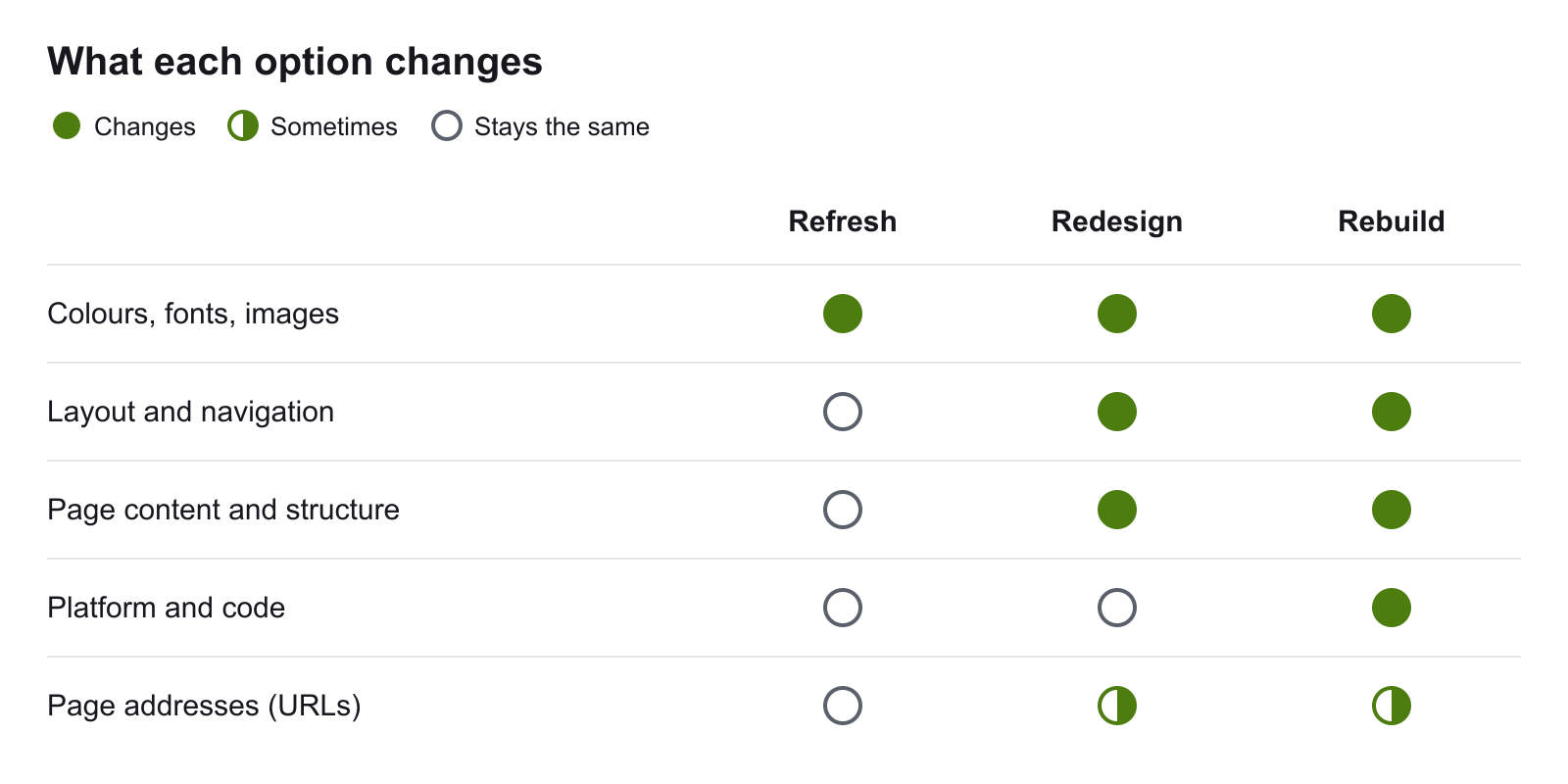
| Refresh | Redesign | Rebuild | |
|---|---|---|---|
| What it is | New colours, fonts, images and some wording on the same pages | New layout, navigation, page structure and content | A new platform or new code underneath the site |
| What stays | Layout, pages, platform | Platform and hosting | Sometimes the design; often nothing |
| The problem it solves | The site looks tired | The site is unclear, off-brand or not converting | The site is slow, unmanageable or cannot do what you need |
| Effort | Smallest | Medium | Largest |
| Main risk | Small | Losing content or page addresses that rank | The same, plus moving content and integrations |
"We need a new website" usually bundles two separate decisions: whether the look should change, and whether the platform should change. Answering them separately is what keeps the project the right size.
When is a website redesign the right call?
A redesign is right when the problem is what visitors see and read, and the machinery underneath is sound. Signs of that:
- The site loads at a reasonable speed and your team can update it, but it looks years out of date.
- Your brand, services or prices have changed and the site has not kept up.
- Visitors arrive but do not enquire, because the message is unclear or the next step is hard to find.
- The navigation has grown page by page and no longer makes sense.
A redesign keeps your platform, content system and hosting. The work is in the layout, the messaging and the path a visitor takes to an enquiry. Our guide to how design affects conversion rate covers what to change first, and common website design mistakes covers what to avoid.
What about a small business website redesign?
For a small business the same test applies, with one extra question: can you or your staff edit the site today? If you can, and the platform is still supported, a redesign or even a refresh is usually enough. If every change needs a developer, the problem is the platform, and that points to a rebuild.
When is a website rebuild the only fix?
A rebuild is right when the problem sits underneath the design, where no visual change reaches it. Signs of that:
- The site is slow in ways that optimisation has not fixed, because the platform is the bottleneck.
- Your team cannot make basic content changes without a developer.
- The platform is discontinued or unsupported, or nobody available understands it.
- You need something the platform cannot support: online sales, bookings, a member area, an integration with your other systems.
These are problems with how the site is built. New design applied over them leaves every one in place.
The expensive mistake: redesigning a site that needs a rebuild
The common way this goes wrong: a business decides the site "feels old", commissions a new look, and gets it applied to the same slow, hard-to-edit platform. A few months later the original complaints are back, because the design was never the cause.
The mistake runs the other way too. A full rebuild is commissioned when the platform was fine and the site only needed clearer pages. That is a larger bill for the same outcome a redesign would have given.
When the answer is neither: an example from our own site
A slow site looks like an obvious case for a rebuild. Ours did. In October 2026 our homepage scored 38 out of 100 on mobile in Google's PageSpeed Insights, and the cause was in the platform: the site builder's JavaScript was redrawing a page that had already loaded.
We did not rebuild or redesign it. We kept the design, the content and the hosting, and changed how four pages are delivered to the browser. The score went to 93 the next day. The full account is in our page speed case study.
The point for your own decision: a symptom such as "slow" does not tell you the size of the fix. Find the cause first. Our guide to why websites are slow lists the usual ones, most of which need neither a redesign nor a rebuild.
How to tell which one your website needs
Ask one question: if the design were perfect tomorrow, would the problems go away?
| If this is true | You most likely need |
|---|---|
| The site works well and only looks dated | A refresh |
| Visitors do not understand the offer or cannot find the next step | A redesign |
| The site is slow, and the cause is images, scripts or hosting settings | A fix in place, not a new site |
| Staff cannot edit content without a developer | A rebuild |
| The platform is unsupported or cannot do what you need | A rebuild |
| The look is dated and the platform is the limit | A rebuild that includes a redesign |
If you are unsure about the platform questions, have the site checked before you commit to either project. A check of speed, indexing and editability costs far less than choosing wrongly, and it tells you whether the problem is what the site looks like or what it is built on.
What does each option cost?
We do not quote a single figure here, because the range is wide and depends on the scope. These are the things that move the price:
- The number of page templates, more than the number of pages. Ten pages on two templates is less work than ten pages on eight.
- Content. Rewriting pages costs more than moving them as they are.
- Integrations. Bookings, payments, a customer database or stock feeds each add work in a rebuild.
- Whether the design changes too. A rebuild that keeps the current design is cheaper than one that also redesigns it.
- Moving the existing site. Redirects, content transfer and testing are part of any rebuild and are often left out of low quotes.
For planning figures, see our Adelaide website pricing guide for 2026. If the platform is part of the question, WordPress vs Shopify compares the two most common choices.
If cost is the deciding factor, our guide to affordable web design in Australia sets out what a lower price should still include.
How do you protect search rankings during a redesign or rebuild?
A redesign and a rebuild can both lose search traffic if page addresses or ranking content change carelessly. Google's own guidance on moving a site with URL changes comes down to a few steps:
- List every current page address before work starts, with the pages that bring in the most search traffic marked.
- Keep the same addresses where you can. An address that does not change needs no redirect.
- Redirect every address that does change to its closest new page, using permanent redirects, one hop each. Google explains the types in its redirects documentation.
- Keep what ranks. Do not drop the titles, headings and copy on pages that already earn search traffic unless you are replacing them with something better.
- Check after launch. Submit the new sitemap in Search Console and watch for pages that return errors.
A refresh rarely touches any of this. A redesign often does, because pages get merged or renamed. A rebuild always does. Our technical SEO checklist covers the checks to run before and after launch.
Whichever you choose, how to choose a web development agency lists what to check before you sign.
Not sure which one you need?
Our Web Design Adelaide service starts by working out whether the problem is the design, the platform or neither, before recommending a project. Get in touch and tell us what is not working on your current site.
Related Web Design Services
If this topic is part of a website project, these service pages explain how wow.digital approaches the build itself:
Keep Reading
Frequently asked questions
What is the difference between a website redesign and a rebuild?
A website redesign changes the look, layout and content of a site while keeping the platform and code it runs on. A website rebuild replaces that platform or code, usually because it cannot do what the business needs, however the site looks.
What is the difference between a website refresh and a redesign?
A refresh updates the surface: colours, fonts, images and some wording, on the same layout and pages. A redesign goes further and changes the layout, navigation, page structure and content. Both keep the existing platform.
Is a website redesign cheaper than a rebuild?
Usually, because a redesign works inside the existing platform and a rebuild means new development. A redesign applied to a platform that is the real problem can cost more in the end, because the rebuild still has to happen afterwards.
How much does it cost to rebuild a website?
It depends on the number of pages and templates, how much content has to be moved, the integrations, and whether the design changes at the same time. Get a quote against a written scope. A rebuild that keeps the current design costs less than one that also redesigns the site.
Will a website redesign or rebuild hurt my search rankings?
It can if page addresses change without redirects, or if content that ranks is removed. Keep the same URLs where possible, redirect every old address that changes to its closest new page, and keep the titles, headings and copy that already bring in search traffic.
When should a small business rebuild its website?
When the platform is the limit: the site is slow for reasons that cannot be fixed in place, staff cannot update content themselves, the platform is no longer supported, or it cannot support something the business needs, such as online sales or bookings.