Website Speed Optimisation: Why Your Site Is Slow and How to Fix It

Quick answer: A slow website is usually caused by one of four things: images that are larger than they need to be, too much JavaScript, a slow server response or missing caching, and web fonts. Website speed optimisation is the work of finding which one applies to your site and fixing it. It rarely needs a redesign, because how a site looks and how fast it loads are mostly separate problems.
This guide covers how fast a site should be, how to find what is slowing yours, the fixes in the order that pays off soonest, what to check on WordPress, and what speed does and does not do for SEO.
How fast should a website be?
Google measures speed with three Core Web Vitals. Each has a published target.
| Measure | What it tells you | Good |
|---|---|---|
| Largest Contentful Paint (LCP) | When the main content appears | 2.5 seconds or less |
| Interaction to Next Paint (INP) | How quickly the page responds to a tap or click | 200 milliseconds or less |
| Cumulative Layout Shift (CLS) | How much the page jumps while loading | 0.1 or less |
An LCP above 4 seconds is rated poor (web.dev). The targets apply at the 75th percentile of real visits, split by mobile and desktop (web.dev). In plain terms: three out of four visits on a phone should meet them, not only the visits on a fast office connection.
What does a slow website cost?
A slow page loses visitors before they read anything. The best-known measurement of that is a 2019 study by Deloitte and 55, commissioned by Google, which tracked 37 large European and American brand sites over 30 days and more than 30 million sessions. It found that a 0.1 second improvement in mobile site speed was associated with 8.4% more conversions on retail sites, and with retail shoppers spending 9.2% more (web.dev).
Read that with care. It is one study, of large brands, paid for by a company with an interest in a faster web. It shows that small speed changes can be measured in sales. It does not tell you what your site will gain.
Speed is one cause of lost enquiries and layout is another. See how design affects conversion rate.
What makes a website slow?
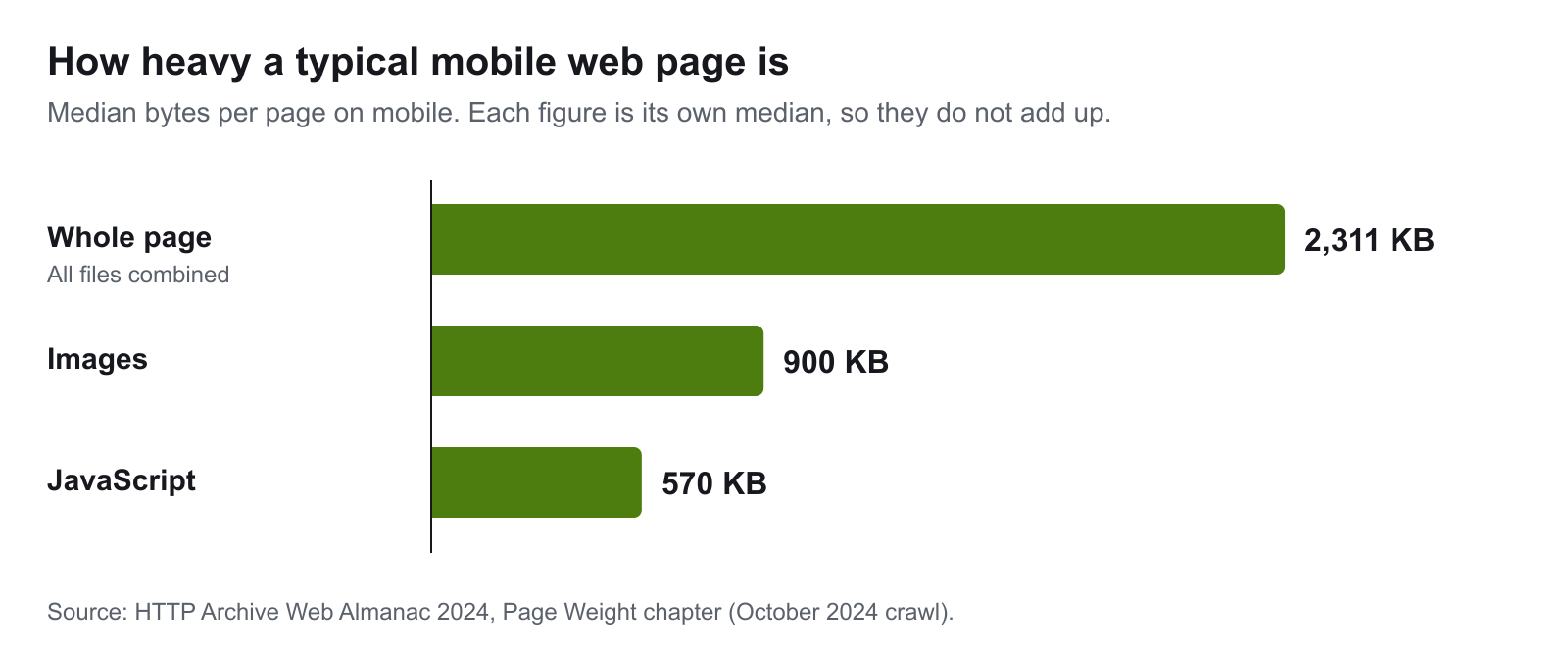
The HTTP Archive measures millions of websites each year. In its October 2024 crawl the median mobile page weighed 2,311 KB, with a median of 900 KB of images and 570 KB of JavaScript (Web Almanac 2024). Those two are where most slow sites should look first.
Images that are larger than they need to be
A photo straight from a phone or a stock library is often several megabytes. Displayed 800 pixels wide, it needs a fraction of that. Two things cut the weight:
- Size. Export the image at the dimensions it is shown at, with a smaller copy for phones.
- Format. Google's figures for its WebP format are 25–34% smaller than a comparable JPEG and 26% smaller than PNG (Google).
Too much JavaScript
JavaScript has to be downloaded, read and run before it does anything, and on a mid-range phone that takes time. The usual sources are the site's own theme or builder, and third-party scripts: analytics, chat widgets, ad pixels, embedded video. Google's guidance on third-party scripts is to load them with async or defer, lazy-load embeds, and remove the ones that do not add clear value (web.dev).
JavaScript can also be the whole problem. On our own homepage the images were fine and the server was fast, yet the mobile score was 38. The site builder's JavaScript was redrawing a page that had already loaded. In our tests, JavaScript execution fell from 3.4 seconds to 0.3 seconds with it removed. The full account is in our page speed case study.
A slow server, or no caching
If the server takes a second to respond, nothing else can start. Without caching, it rebuilds the same page for every visitor. Without a content delivery network (CDN), every visitor fetches files from one location, however far away they are. These are usually hosting settings, not development work.
Web fonts
Each font weight is a separate file. Loading five weights when the design uses two adds delay, and fonts that block text until they arrive make the page look empty. Load only the weights in use, and let text show in a fallback font while the web font loads (web.dev).
Content that moves after it loads
Images without set dimensions, banners inserted late and fonts that swap all push content around. This is what the layout shift score measures. It makes a page feel slow and unstable even when it loads quickly.
How do you find what is slowing your website?
Measure before you change anything. It takes a few minutes.
- Run PageSpeed Insights on your home page and your two or three busiest pages. Read the mobile result.
- Look at the top section first. If your site has enough visitors, it shows real-visitor data for the three Core Web Vitals. That is the result that counts.
- Find the LCP element. The report names the element that was the largest paint: usually the main image or the headline.
- See what it was waiting for. Google splits LCP into four parts: server response, the delay before the image starts loading, the time it takes to load, and the delay before it is drawn. As a guide, server response and load time should each be about 40% of the total, and the two delays under 10% each (web.dev). A part that is far over its share is where the problem is.
- Test more than once. Lab scores vary between runs.
If the first paint is quick and the largest paint is very late, look at JavaScript before images.
Website speed optimisation: what to fix first
| Order | Fix | What to do | Helps |
|---|---|---|---|
| 1 | Images | Resize to the displayed size, convert to WebP or AVIF, serve a smaller copy to phones | LCP, page weight |
| 2 | The main image | Do not lazy-load it. Google's guidance is to never lazy-load the LCP image | LCP |
| 3 | Images further down | Lazy-load them, so they load as the visitor scrolls | Page weight |
| 4 | Scripts | Remove what is unused; load the rest with defer or async |
LCP, INP |
| 5 | Caching and CDN | Switch on page caching and a CDN at the host | Server response |
| 6 | Fonts | Load only the weights in use; show fallback text while they load | LCP, CLS |
| 7 | Layout shifts | Set width and height on images; reserve space for anything added late | CLS |
| 8 | Measure again | Same tool, same page, before and after | Proof |
Work down the list and stop when the numbers are good. Most sites do not need all eight.
How do you speed up a WordPress website?
WordPress sites share the causes above and add a few of their own. WordPress's own performance documentation is direct about where to start: caching gives "the biggest benefit for the smallest hassle" (WordPress).
- Caching. A page caching plugin, or caching at the host, saves each page as a static file. Add object caching if the host supports it.
- Plugins. The same documentation says the number of plugins and how well they are written has "a huge impact", and that deleting the ones you do not need is a significant improvement.
- Images. Compress on upload and serve modern formats.
- Theme and page builder. A heavy theme or builder loads its code on every page. If the basics are done and the site is still slow, this is usually why.
- Hosting. Cheap shared hosting limits every other fix.
- A CDN for images, scripts and stylesheets.
The WordPress Performance Team also publishes the free Performance Lab plugin, which previews speed features before they reach WordPress itself. If a WordPress site stays slow after these steps, the build is the problem. Our WordPress web design service covers what a lean build looks like.
Does website speed affect SEO?
Yes, but less than many checklists suggest. Google's documentation says Core Web Vitals are used by its ranking systems, and in the same passage that good results do not guarantee top rankings (Google Search Central). A fast page with thin content will not outrank a slower page that answers the search better.
Treat speed as a floor to clear. Get the three Core Web Vitals into the good range, then put the effort into content and structure. Our technical SEO checklist puts speed in context with the other checks.
When is speed optimisation not enough?
Sometimes the platform is the limit: an old page builder, a theme that loads everything everywhere, or hosting that cannot be tuned. The sign is that you have done the fixes above and the largest paint has not moved.
Even then, the answer is not always a new website. Our own site looked like a case for a rebuild and was fixed by changing how four pages are delivered, with the design untouched. If you are weighing it up, website redesign vs rebuild covers how to tell the difference, and common website design mistakes covers the design choices that slow a site down in the first place.
Do you need page speed optimisation services?
Do the basics yourself if you can: compress images, switch on caching, remove what you do not use. Bring someone in when:
- the slow part is JavaScript, the theme or the server
- the site is custom built
- you have done the basics and the numbers have not changed
- the site earns enough that a slow week costs real money
A page speed optimisation service should give you three things: measurements before and after from the same tool, a list of what was changed, and no change to how the site looks without your approval.
Want to know what is slowing your site?
Run your home page through PageSpeed Insights on mobile and note the largest paint. If it is well over 2.5 seconds and the fixes above have not moved it, get in touch and send us the result. Our Web Design Adelaide service includes this diagnosis for new builds and existing sites.
Related Web Design Services
If this topic is part of a website project, these service pages explain how wow.digital approaches the build itself:
Keep Reading
Frequently asked questions
What is a good website load time?
Google's measure is Largest Contentful Paint, the moment the main content appears. Its guidance is 2.5 seconds or less for a good experience, and more than 4 seconds is rated poor. The figure is judged at the 75th percentile of real visits, so most visitors, not the average one, should get it within 2.5 seconds.
Do I need to redesign my website to make it faster?
Rarely. The common causes of a slow site are oversized images, too much JavaScript, slow server response, missing caching and web fonts. All of them can be fixed without changing how the site looks. A rebuild is only needed when the platform itself is the limit and the fixes in place have been tried.
How much does website speed affect conversions?
It depends on the site, but the effect is measurable. A 2019 study by Deloitte and 55, commissioned by Google, covered 37 large European and American brands and found that a 0.1 second improvement in mobile site speed was associated with 8.4% more retail conversions. That is one study of large brands, so treat it as direction, not a forecast for your site.
How do I speed up a WordPress website?
Start with caching, which WordPress's own documentation says gives the biggest benefit for the smallest effort. Then remove plugins you do not need, compress and resize images, and check the hosting. A heavy theme or page builder can limit how far these fixes go.
Does site speed affect SEO?
Yes, modestly. Google says Core Web Vitals are used by its ranking systems, and also that good scores do not guarantee top rankings. Relevance and content matter more. Speed is worth fixing mainly because slow pages lose visitors before they read anything.
Do I need page speed optimisation services, or can I do it myself?
Image compression, caching and removing unused plugins are within reach of most site owners. Hire someone when the slow part is JavaScript, the theme or the server, when the site is custom built, or when you have tried the basics and the numbers have not moved. Ask for before and after measurements from the same tool.