Shopify SEO Checklist for Australian Stores (2026)
Quick answer: Shopify SEO comes down to six areas: set up your domain and Search Console, build collections around what shoppers search for, make product pages unique, fix duplicate URLs, redirects and slow apps, publish content Google and AI tools can use, and make prices, shipping and returns clear for Australian buyers. Shopify handles the sitemap, a default robots.txt and the editing fields; deciding what goes into your collections, titles and product copy is up to you. Work through the 25 checks below in order.
This checklist is for Australian store owners doing their own SEO or checking an agency's work. Shopify behaviour is quoted from Shopify's Help Center, checked in October 2026.
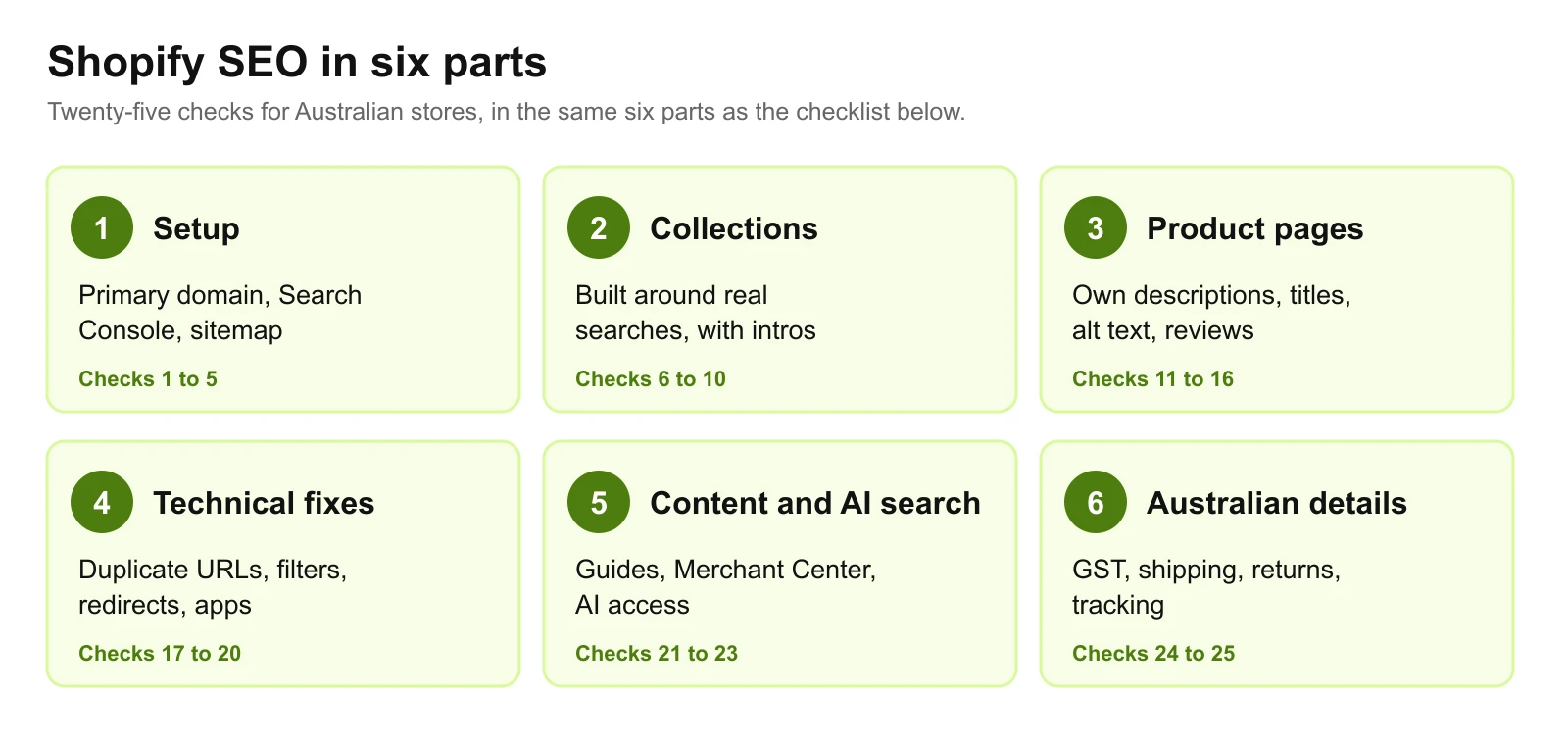
Part 1: Setup
1. Choose one primary domain and redirect the rest. If you own the .com.au and the .com, or still have the store.myshopify.com address, set one as primary. Shopify notes that all of your domains are discoverable by search engines "unless they redirect to your primary domain" (Shopify Help Center).
2. Turn off the store password at launch. A password-protected store can't be crawled by search engines, so remove the password page as soon as you go live.
3. Verify your store in Google Search Console as a domain property, which covers every version of the address.
4. Submit your sitemap. Shopify generates it at yourstore.com.au/sitemap.xml and says it "contains links to all your products, primary product image, pages, collections, and blog posts". Submit that address in Search Console.
5. Leave robots.txt alone unless you have a reason. Shopify says "the default robots.txt file works for most stores". You can customise it by adding a robots.txt.liquid template, but a mistake there can hide the whole store (Shopify Help Center).
Part 2: Collections
Collections are usually a store's most valuable search pages. Someone searching "linen dresses" or "camping chairs" wants a range to choose from, and a collection page is exactly that.
6. Plan collections around real searches. Use a keyword tool or Google's own suggestions to find what shoppers call your products, then make sure a collection matches each important search. Shopify's own advice is to "prioritize keywords that are specific to your products and business and are also searched for often" (Shopify Help Center).
7. Write an introduction for every key collection. Add a short paragraph that helps shoppers choose, such as how to pick a size or which material suits which use. A collection page with only a product grid gives Google little to rank.
8. Give each collection its own title and meta description in the search engine listing section, written for that range, not the store.
9. Link to key collections from the main menu. Pages linked from navigation are found and valued more easily than pages buried three clicks deep.
10. Avoid near-duplicate collections. "Women's linen dresses" and "linen dresses for women" as separate collections compete with each other. Merge them and redirect the spare.
Part 3: Product pages
11. Write your own product descriptions. Supplier copy appears on every other store selling the same product. Describe who it suits, how it fits, what it's made of and how it compares.
12. Write a unique title and meta description for priority products. Shopify lists four main places to use keywords: "page titles, meta descriptions, ALT tags, a page's body content", and warns that "search engines might ignore websites that don't use readable phrases".
13. Add alt text to product images describing the product, colour and angle. It helps image search and shoppers using screen readers.
14. Show reviews on product pages. They answer shoppers' questions in their own words and give the page fresh, specific content.
15. Check your Product structured data. Most Shopify themes output it. Test a product page in Google's Rich Results Test to confirm price, availability and reviews are read correctly; Google's product structured data guide lists the fields.
16. Handle out-of-stock products deliberately. If a product will return, keep the page live and say when. If it's gone for good, redirect it to the closest alternative.
Part 4: Technical fixes
17. Check duplicate product URLs. Shopify can show the same product at /products/linen-dress and at /collections/dresses/products/linen-dress. Check that the canonical tag on each version points to the /products/ address, and that your theme links to it. Our technical SEO checklist covers canonical tags in more depth.
18. Keep filter and tag pages under control. Filters can generate thousands of URL combinations. In Search Console's Pages report, check whether filter or tag-combination URLs are being indexed. Turn the filters people search for, such as a colour or material, into real collections, and ask your developer to keep the rest out of the index.
19. Redirect changed and deleted URLs. Shopify's redirect tool works only from URLs that are already broken, can't redirect Shopify's fixed index paths themselves (/products, /collections and /collections/all), and allows up to 100,000 redirects, or 20,000,000 on Plus (Shopify Help Center). When you change a product's URL, create the redirect at the same time.
20. Remove apps you don't use. Most apps add scripts to the storefront, and every script slows the page. After uninstalling an app, check the theme for leftover code. Our guide to why websites are slow covers the usual culprits.
Part 5: Content and AI search
21. Publish buying guides that link to collections. Size guides, comparisons and how-to-choose articles answer the questions shoppers ask before buying, and each one can send readers to the right range.
22. Connect Google Merchant Center. Free product listings in Google Shopping come from Merchant Center. Keep the product data, prices and shipping there consistent with the store.
23. Decide how AI tools see your store. Shopify explains there are two routes. If you sell through agentic storefronts such as ChatGPT or Microsoft Copilot, product data is shared through Shopify Catalog "independently of /robots.txt". AI crawlers can also read your store on the open web, which you control with robots.txt.liquid (Shopify Help Center). For Google's AI features specifically, see our guide on how to rank in AI Overviews. Clear, accurate product information helps on both routes. Our guide to getting recommended by ChatGPT covers the wider picture.
Part 6: Australian details and tracking
24. Make prices, shipping and returns clear. Show prices including GST, delivery costs and times to each state, and your returns policy, on product pages and in Merchant Center. Interstate shoppers decide on these.
25. Track organic search by collection. In Search Console, filter performance by page to see which collections gain impressions and clicks, and in Shopify analytics, check sales from organic search. Judge progress on revenue, not traffic.
The checklist in one table
| # | Check | Part |
|---|---|---|
| 1 | One primary domain, others redirected | Setup |
| 2 | Store password off at launch | Setup |
| 3 | Search Console domain property verified | Setup |
| 4 | Sitemap submitted | Setup |
| 5 | Default robots.txt kept unless needed | Setup |
| 6 | Collections planned around searches | Collections |
| 7 | Introduction on every key collection | Collections |
| 8 | Unique collection titles and descriptions | Collections |
| 9 | Key collections in the main menu | Collections |
| 10 | Near-duplicate collections merged | Collections |
| 11 | Own product descriptions | Products |
| 12 | Unique product titles and descriptions | Products |
| 13 | Product image alt text | Products |
| 14 | Reviews on product pages | Products |
| 15 | Product structured data tested | Products |
| 16 | Out-of-stock plan | Products |
| 17 | Duplicate product URLs canonicalised | Technical |
| 18 | Filter and tag pages controlled | Technical |
| 19 | Redirects for changed URLs | Technical |
| 20 | Unused apps removed | Technical |
| 21 | Buying guides linked to collections | Content and AI |
| 22 | Merchant Center connected | Content and AI |
| 23 | AI access decided | Content and AI |
| 24 | GST-inclusive prices, shipping and returns clear | Australia |
| 25 | Organic search tracked by collection | Australia |
Doing it yourself or getting help
Most of parts 1 to 3 is work any store owner can do with the built-in fields. Parts 4 and 5 often need theme changes, and that is where a Shopify developer earns their fee. If you would like help, we are a Shopify Partner with 15+ years in SEO and development; our Shopify SEO and Shopify store development pages explain how we work, and we'll go through your store as part of a free website and SEO audit.
Still choosing a platform? Our comparisons of Shopify and WooCommerce and WordPress and Shopify cover the trade-offs for Australian businesses.
Work With wow.digital
If you would rather have this handled for you, these pages explain what we do and where we work:
Keep Reading
Frequently asked questions
Is Shopify good for SEO?
Yes, for most stores. Shopify generates a sitemap automatically, provides a default robots.txt file it describes as optimal for SEO, and gives you fields for titles, descriptions and alt text. Its weak points are fixed URL prefixes, duplicate product URLs under collections, filter pages and apps that slow the store, all of which can be managed.
How do I improve SEO on Shopify?
Start with collections: plan them around what shoppers search for and give each one useful introductory copy. Then write unique product titles and descriptions, add image alt text, check that duplicate product URLs point to one canonical version, remove apps you don't use, set up redirects for changed URLs and submit your sitemap in Google Search Console.
Where is my Shopify sitemap?
At the root of your domain, for example yourstore.com.au/sitemap.xml. Shopify generates it automatically, and it links to separate sitemaps for products, collections, pages and blog posts. Submit it in Google Search Console.
Can I edit robots.txt on Shopify?
Yes, by adding a robots.txt.liquid template to your theme. Shopify says the default file works for most stores, so only change it for a specific reason, such as blocking a particular crawler, and test the result.
Do I need an SEO app for Shopify?
Not necessarily. Titles, descriptions, alt text, redirects and the sitemap are built in. Apps can help with bulk editing, image compression or structured data, but every app that adds scripts to the storefront can slow the store, so install only what you will use.