Local SEO for Small Business: A Step-by-Step Guide for Australia
Quick answer: Local SEO for a small business means making sure nearby customers find you when they search for what you do: in Google Maps, in searches with a suburb or "near me", and increasingly in AI answers. Google says local results "are mainly based on relevance, distance, and popularity". You can't change your distance from a customer, but you can make your business more relevant and better known in eight steps: claim and verify your Google Business Profile, complete every field, build a review habit, make your details consistent everywhere, give each service and area a page, add local signals to your website, earn local mentions, and track the results. The first four cost nothing but time.
This guide is for Australian small business owners who want to do it themselves or check an agency's work. Every rule quoted from Google links to Google's own help page, checked in October 2026.
What is local SEO?
Local SEO, or local search optimisation, is the work of getting your business in front of people searching nearby. When someone searches "electrician Glenelg" or "cafe near me", Google usually shows a map with a few businesses, often called the map pack, before the normal results. Local SEO gets you into that list, and into the normal results for searches with a place in them.
It differs from general SEO in where the work happens. General SEO is mostly about your website. Local SEO adds your Google Business Profile, your reviews and your listings on other sites, because those decide the map results.
Any business that serves customers in a particular area needs it: shopfronts such as cafes, clinics and retailers, and service area businesses such as tradies, cleaners and mobile services. If you are a tradie, our page on websites for tradies covers the website side.
How Google ranks local businesses
Google's help page puts it plainly: "Local results are mainly based on relevance, distance, and popularity" (Google Business Profile Help). It describes each one like this:
| Factor | What Google says it means | What you can do |
|---|---|---|
| Relevance | How well a Business Profile matches what someone is searching for | Choose accurate categories, list every service and write a page for each one |
| Distance | How far each business is from the person searching | Little, except state your service areas clearly |
| Prominence | How well known a business is, based on info like how many websites link to it and how many reviews it has | Collect genuine reviews and earn mentions and links from other sites |
Google's summary calls the third factor popularity, and its detailed explanation calls it prominence: how well known a business is. The same page adds: "There's no way to request or pay for a better local ranking on Google." Everything below works on relevance and prominence, the two factors you can influence.
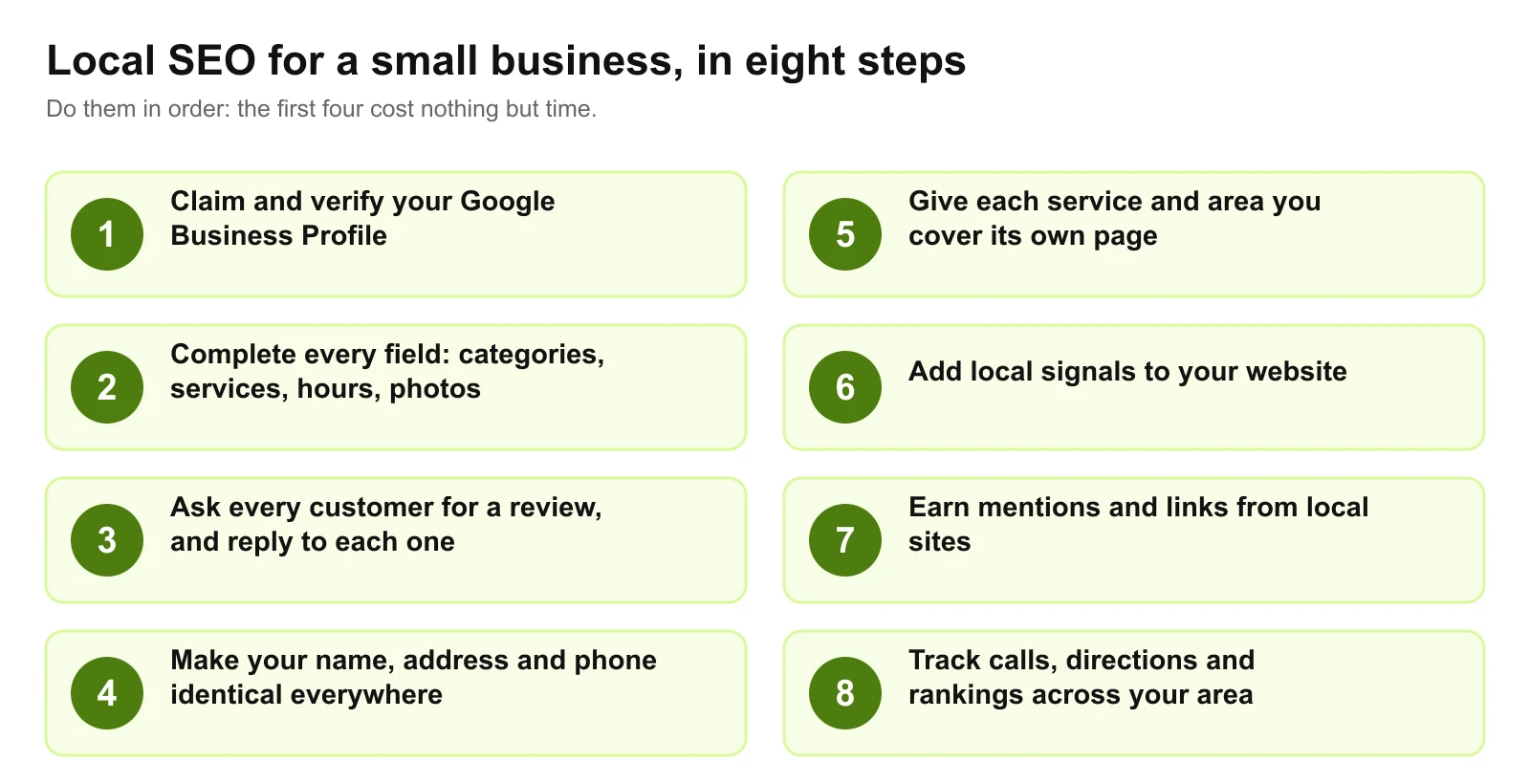
Step 1: Claim and verify your Google Business Profile
Your Google Business Profile is what appears in Google Maps and the map results. Claim it at business.google.com and complete verification. Google says verification "tells Google that you're authorized to represent the business, so it's more likely to show up in search results" (Google Business Profile Help).
Three decisions at this stage cause most of the problems we see later:
- Your business name. Use your real-world name and nothing more. Google says including unnecessary information in your business name "isn't permitted, and could result in the suspension" of the profile (Google's guidelines). "Smith Plumbing" is fine. "Smith Plumbing Adelaide Emergency Hot Water 24/7" risks the whole profile.
- Shopfront or service area. If customers visit you, show your address. If you go to them, set up as a service area business: hide the address and list the suburbs and regions you serve. Google says the service area "shouldn't extend farther than about 2 hours of driving time from where your business is based".
- Your address. It must be somewhere you actually work. Google says a rented mailing address you don't operate from, "also known as a virtual office", isn't eligible for a Business Profile.
Our Google Business Profile optimisation checklist goes through every field, photo standard and review setting in detail.
Step 2: Complete every field
Google is direct about this one: "Businesses with complete and accurate info are more likely to show up in local search results" (Google Business Profile Help).
- Primary category. Google's guidelines ask for categories "that are as specific as possible, but representative of your main business". "Emergency plumber" beats "plumber" if that is most of your work. Add secondary categories only for things you really do.
- Services. List every service you sell, in your customers' words.
- Hours. Include special hours for public holidays. State holidays differ around Australia, so set them for your own state, such as Adelaide Cup Day in South Australia.
- Photos. Real photos of your premises, team and work. Add new ones as you finish jobs.
- Attributes and products. Fill in whatever applies to you, such as accessibility details, and in-store products if you run a retail shop.
Step 3: Build a review habit
Reviews are the prominence factor you control most directly. Google says "more reviews and positive ratings can help your business's local ranking", and that replying to reviews "shows that you value their feedback".
The businesses that collect reviews steadily do it the same way every time:
- Ask at the moment the customer is happiest: when the job is finished or the order arrives.
- Make it one tap: a short review link or QR code on invoices, receipts, emails and the counter.
- Ask everyone, not just the customers you expect to be happy.
- Reply to every review, good or bad, within a few days. With a negative one, stay calm, be specific and offer to fix it offline.
Two rules apply. Google's policy prohibits businesses from discouraging negative reviews or selectively soliciting positive ones, and from offering anything in exchange for a review (Google's review policy). And in Australia, the ACCC says "it's against the law for a business to create fake or misleading reviews or to arrange for others to do so" (ACCC). Registered health practitioners also have Ahpra's advertising rules on testimonials to work within.
Step 4: Make your details identical everywhere (local citations)
A local citation is any listing of your business name, address and phone number, often shortened to NAP, on another website. Google doesn't say how much matching listings count, but when they match your Business Profile exactly, customers, search engines and AI tools all see the same facts. When an old address or phone number lingers, they see conflicting ones.
| Where to list | Why |
|---|---|
| Apple Business Connect | Controls how you appear in Apple Maps on iPhones |
| Bing Places | Controls how you appear in Bing Maps |
| True Local, Yellow Pages, Hotfrog, StartLocal | Long-standing Australian directories that search engines read |
| Industry bodies and associations | Trusted, relevant listings, such as a trade association's "find a member" page |
| Chambers of commerce and council directories | Local relevance, such as Business SA in South Australia |
| Suppliers and manufacturers | "Find an installer" or stockist pages for the brands you work with |
Use the same business name, the same address format and the same phone number on all of them. Then search your old phone numbers and addresses and update or remove what you find.
Step 5: Give each service and area its own page
Your website feeds relevance. A single "Services" page listing everything gives Google little to match against "hot water system replacement" or "deck builder Mount Barker". One page per main service, written in your customers' words, gives it something specific.
Area pages need more care. Build them only for places you genuinely serve, and say something specific on each: the jobs you do there, how quickly you can attend, local projects. Near-identical pages that swap one suburb name for another are what Google's spam policies call doorway pages.
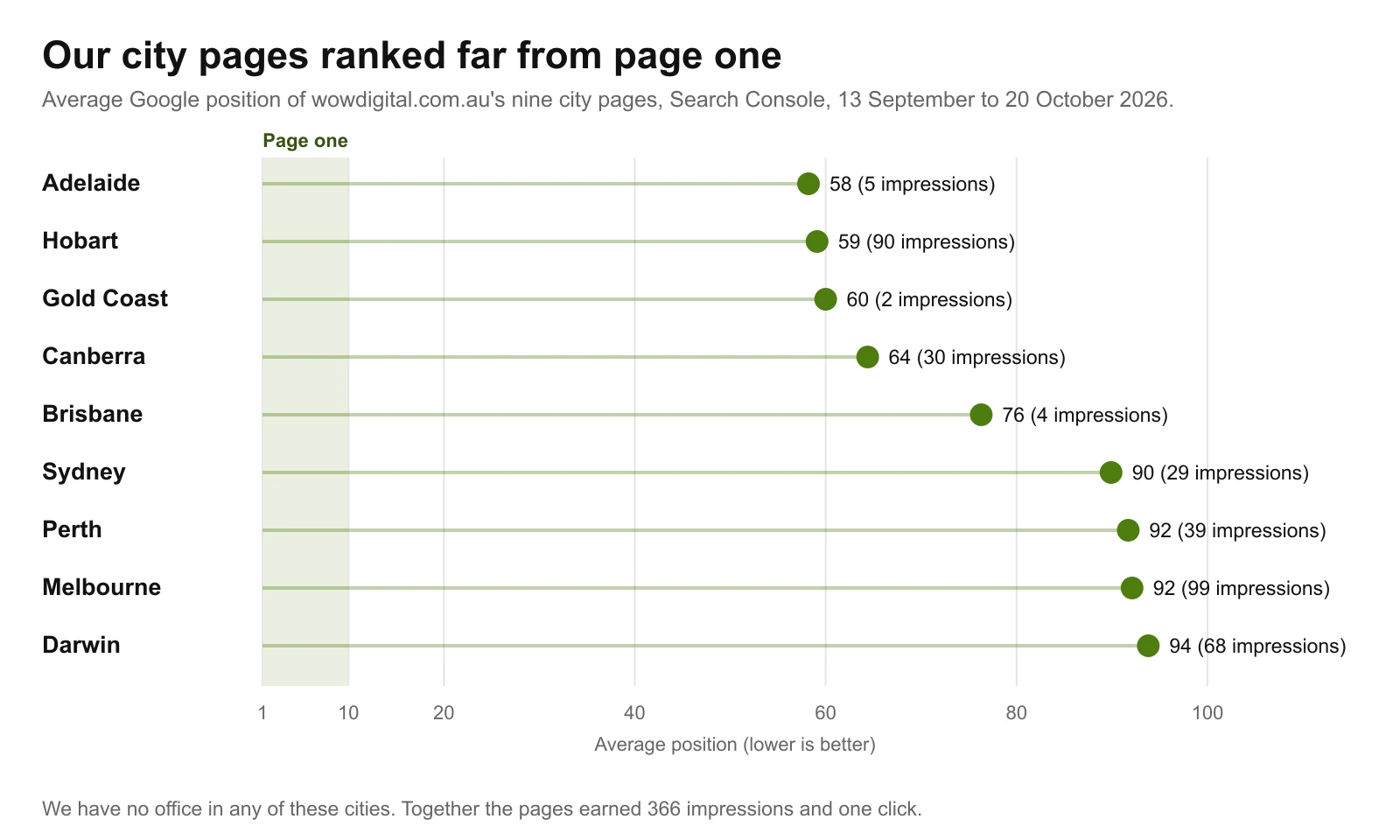
We learned this on our own site. We built nine city pages for cities where we have no office. Between going live on 18 September and 20 October, they averaged positions 58 to 94 in Google Search Console and earned one click between them. The one search that reached page one makes the same point: "generative engine optimization in hobart", at position 2 and most likely on our Hobart page, is so specific that almost nobody else targets it. Our first six weeks of Search Console data has the full picture. That is no worse than the rest of our new site, so it doesn't prove city pages fail. It does show that a page alone creates no local reputation, so put your effort into the areas you really serve.
Step 6: Add local signals to your website
- Your name, address and phone number on every page, usually in the footer, matching your Business Profile exactly.
- LocalBusiness structured data, which describes your business, address, hours and contact details in a format search engines read. Google's LocalBusiness documentation explains the fields.
- A contact page that works on a phone, with tap-to-call, directions or your service area, and your hours.
- Speed on mobile, because local searches often happen on a phone on the move. Our guide to why websites are slow covers the usual fixes.
- The right link from your profile. Point your Google Business Profile at the page that best matches it: the homepage for a single location, or the location's own page if you have several.
The wider technical checks, from crawling to indexing, are in our technical SEO checklist, and our SEO services cover the ongoing work.
Step 7: Earn local mentions and links
Google says prominence is "based on info like how many websites link to your business and how many reviews you have". Links and mentions from local and industry sites are the slowest part of local SEO and the hardest for competitors to copy.
Good sources for a small business:
- Sponsoring a local sports club, school event or charity that lists its sponsors
- Suppliers and manufacturers that list approved installers or stockists
- Your industry association and local chamber of commerce
- Community newspapers and local news sites, with a genuine story or expert comment
- Businesses you work alongside, such as a builder and an electrician recommending each other
Don't pay for links. Link schemes breach Google's spam policies and can sink a site.
Step 8: Track what matters
- Business Profile performance: calls, direction requests and website clicks from your profile, and the searches that found you.
- Google Search Console: the searches your website appears for, especially ones with suburb names, and your position for each.
- Rankings across your area: map results change with the searcher's location, so a business can rank first at its own address and not at all a few suburbs away. Check from several places, or use a rank tracker that tests a grid of points.
- Enquiries: ask new customers how they found you, and track calls and forms from your website.
Judge progress on calls and enquiries. Rankings are a step along the way.
Local SEO and AI answers
Australians increasingly ask AI tools for recommendations. Roy Morgan found that 10.5 million Australians aged 14 and over, 45%, used ChatGPT in an average four weeks in the March quarter of 2026 (Roy Morgan). It didn't measure local searches specifically.
Local SEO helps here too. Google says "the best practices for SEO continue to be relevant because our generative AI features on Google Search are rooted in our core Search ranking and quality systems" (Google Search Central). Consistent business details, genuine reviews and clear service pages give AI tools accurate facts to draw on. Our guide to getting recommended by ChatGPT and our AI SEO service go further.
Common local SEO mistakes
- Keywords in the business name. It breaks Google's guidelines and can get the profile suspended.
- A virtual office or PO box as your address. Neither is eligible for a Business Profile.
- Buying reviews or asking only happy customers. Both breach Google's policy, and fake reviews are illegal in Australia.
- Near-identical suburb pages. They read as doorway pages and rarely rank.
- Old phone numbers and addresses left online. Inconsistent details undermine trust in the right ones.
- Ignoring reviews. Unanswered complaints are read by every customer who checks you out.
- Checking rankings from your own desk. You will always look better near your own address than you do across your area.
How long does local SEO take?
Google says "some changes might take effect in a few hours, others could take several months", and suggests waiting a few weeks before judging whether a change worked (Google's SEO Starter Guide).
In practice, fixes to your Business Profile and listings can show within weeks. Prominence, the reviews and mentions that build up over time, takes months, and it compounds: a business that asks for a review after every job is in a much stronger position a year later.
Doing it yourself or getting help
Most of the first four steps need nothing more than free tools: Google Business Profile, Google Search Console, Apple Business Connect and Bing Places. Paid local SEO tools mostly help with tracking rankings across a grid of locations and managing listings at scale.
If you hire help, prices vary widely. On Google's first page for "local seo australia", one national provider advertises local SEO "from $499/mo" (Localsearch, checked 24 October 2026). Adelaide agencies that publish prices, including Digital Marketing Adelaide, Loudachris and ADEL SEO, charge roughly $1,200 to $2,000 plus GST a month for ongoing SEO for a small local business (checked October 2026). Our guide on how to choose a local SEO agency covers what to ask before you sign, and our local SEO Adelaide page sets out what we do.
Local SEO checklist
- Claim and verify your Google Business Profile.
- Use your real business name, with no added keywords.
- Choose the most specific primary category.
- Fill in every service, your hours, holiday hours and your address or service areas.
- Add real photos and keep adding them.
- Ask every customer for a review, and reply to every review.
- List your business on Apple Business Connect, Bing Places and the main Australian directories.
- Make your name, address and phone number identical everywhere, and fix old listings.
- Give each main service its own page on your website.
- Add pages for the areas you genuinely serve, each with something specific to say.
- Add LocalBusiness structured data and your details to every page.
- Track calls, directions, enquiries and rankings across your area.
Want a second pair of eyes? We'll check your Google Business Profile, listings and website as part of a free website and SEO audit and tell you which of these twelve to fix first.
Work With wow.digital
If you would rather have this handled for you, these pages explain what we do and where we work:
Keep Reading
Frequently asked questions
What is local SEO?
Local SEO, also called local search optimisation, is the work of getting a business found by nearby customers: in Google Maps, in the map results above Google's normal listings, and in searches with a place in them, such as plumber Norwood or cafe near me. It centres on your Google Business Profile, reviews, consistent business details and pages about your services and areas.
How much does local SEO cost in Australia?
A national provider advertises local SEO from $499 a month, and Adelaide agencies that publish prices charge roughly $1,200 to $2,000 plus GST a month for ongoing SEO for a small local business, as of October 2026. Much of the groundwork, such as a complete Google Business Profile and a habit of asking for reviews, costs only time.
How do I track local SEO results?
Check your Google Business Profile performance for calls, direction requests and website clicks, use Google Search Console for searches that include suburb names, check rankings from several locations across your area, and ask new customers how they found you.
Do I need a website for local SEO?
You can appear in Google Maps with a Business Profile alone, but a website gives Google more to match against searches, with a page for each service and area, and gives customers somewhere to check you out before they call.
Can I do local SEO myself?
Yes, most of it. Verifying and completing your Google Business Profile, asking for reviews, fixing your listings and writing a page for each service take time rather than money. Paid help earns its fee on technical website work, ongoing content and earning links and mentions.
What are local citations?
A local citation is any listing of your business name, address and phone number on another website, such as Apple Business Connect, Bing Places, True Local, Yellow Pages or an industry directory. When they match your Google Business Profile exactly, customers, search engines and AI tools all see the same facts.
Can I rank in Google Maps without a shopfront?
Yes. If customers don't visit you, set your Business Profile up as a service area business: hide the address and list the areas you serve, within about two hours' drive of your base. A virtual office, a rented address you don't work from, isn't eligible.